











Загрузка…
Ваш файл загружается, пожалуйста, подождите...
Бесплатно Загрузчик видео из Твиттера
Сохраняйте видео X в HD-качестве.
Вставьте любую ссылку на статус в Твиттере или X (twitter.com / x.com), просмотрите видео и загрузите его прямо на свое устройство — быстро, бесплатно и без водяных знаков.
О программе Toolizo для загрузки видео из Twitter
Создано для всех, кому нужно быстро, удобно и на любом устройстве сохранить видео из твита.
Тулизо загрузчик видео из Твиттера Это быстрая браузерная утилита, которая извлекает чистые MP4-файлы из любого общедоступного твита на twitter.com или x.com. Вам не нужна учетная запись, расширение или технические навыки — просто вставьте ссылку на статус, посмотрите предварительный просмотр и нажмите кнопку загрузки. Через несколько секунд видео окажется прямо на вашем телефоне, планшете или компьютере.
Как x видео загрузчикЭтот инструмент обрабатывает все современные URL-адреса, используемые сегодня Twitter: twitter.com//status/, x.com//status/, ссылки mobile.twitter.com и короткие переадресации t.co, которыми делятся в личных сообщениях или на других платформах. Независимо от того, от кого исходит твит — от подтвержденного аккаунта, спортивного комментатора, новостного издания или вашего любимого автора — Toolizo преобразует исходный медиафайл в его исходное разрешение.
После загрузки появляются два варианта чистой загрузки: один для видеофайл в максимально доступном качествеи один для миниатюра (изображение для предварительного просмотра)Никаких фальшивых кнопок, никаких лишних вкладок, никаких всплывающих окон. Загрузка запускается через потоковый прокси, а это значит, что файл сохраняется непосредственно на ваше устройство, как обычный файл, а не открывается в новой вкладке, где браузер мог бы его воспроизвести.
За простым интерфейсом скрывается надежность инструмента. Каждый запрос обрабатывается в режиме реального времени, ответ анализируется и проверяется, а ссылки для скачивания передаются через серверный прокси, обрабатывающий HTTP-запросы Range. Именно эта техническая деталь обеспечивает ощутимую разницу: плавное перелистывание предварительного просмотра в браузере, возможность сохранить файл на устройство, а не просто постоянно открывающаяся вкладка, и отсутствие неработающих ссылок из-за просроченных токенов.
Каждый формат видео X
Стандартные видеоролики в твитах, ответы, цитируемые твиты, новостные ролики, спортивные обзоры и видеоролики, встроенные в цепочки сообщений, — все это поддерживается на twitter.com и x.com.
Высочайшее качество, без водяных знаков.
Файлы предоставляются в исходном разрешении — обычно 720p или 1080p в зависимости от того, что загрузил автор — без какой-либо дополнительной символики Toolizo.
Конфиденциальность по умолчанию
Ваш URL-адрес обрабатывается в режиме реального времени и немедленно удаляется. Toolizo не регистрирует состояние ссылок, IP-адреса или какую-либо личную информацию.
Работает на всех устройствах
iPhone, Android, iPad, Windows, macOS, Linux — всё, что имеет браузер. Не нужно устанавливать приложения, предоставлять разрешения или включать плагины.
Как пользоваться этим загрузчиком видео из Твиттера
Всего четыре простых шага — менее тридцати секунд от копирования до загрузки.
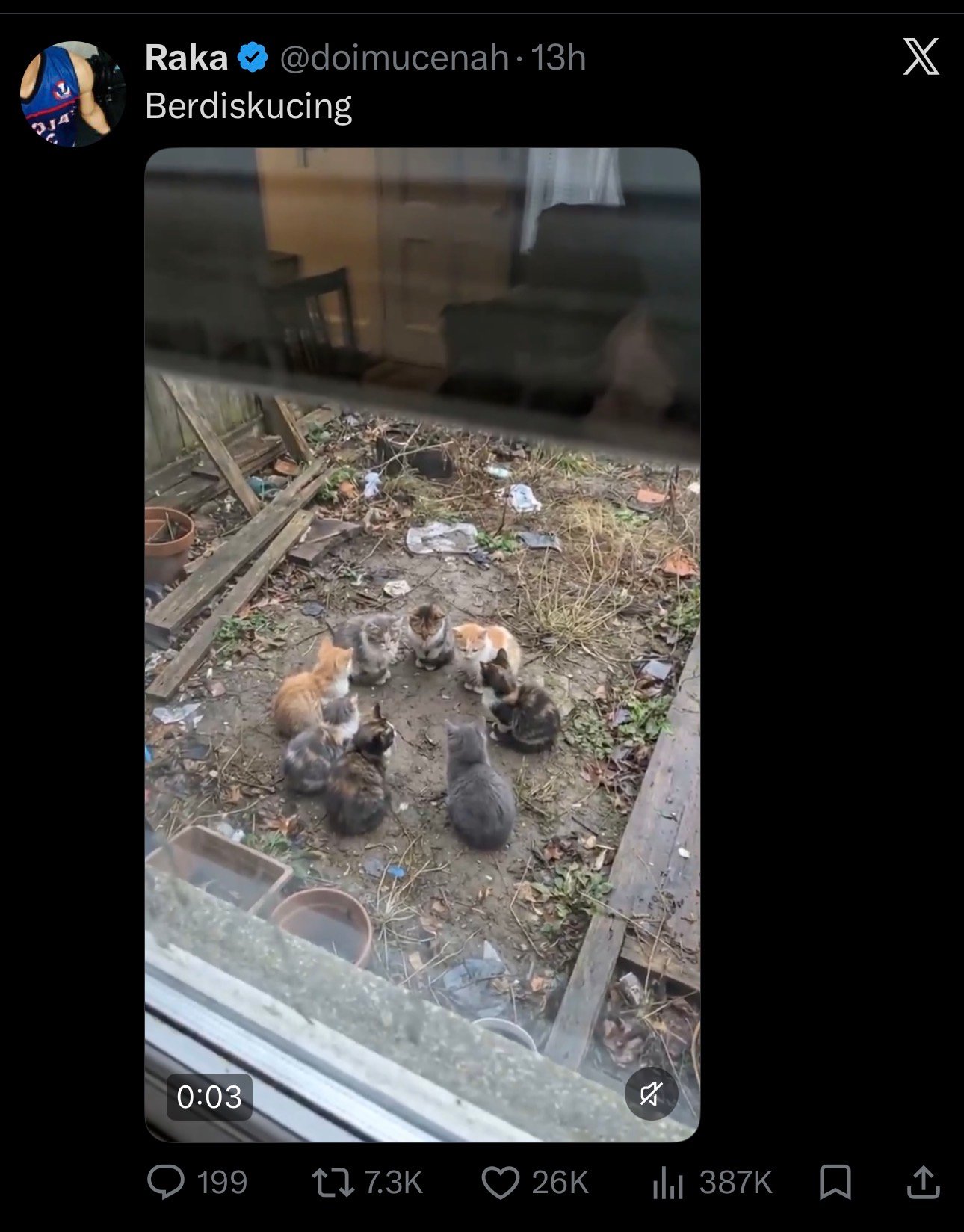
Откройте твит в Твиттере или X
Найдите общедоступный твит, содержащий видео, которое вы хотите сохранить — это может быть на twitter.com, x.com или в официальном мобильном приложении. Убедитесь, что публикация видна без авторизации; сторонние инструменты не поддерживают частные и защищенные учетные записи.
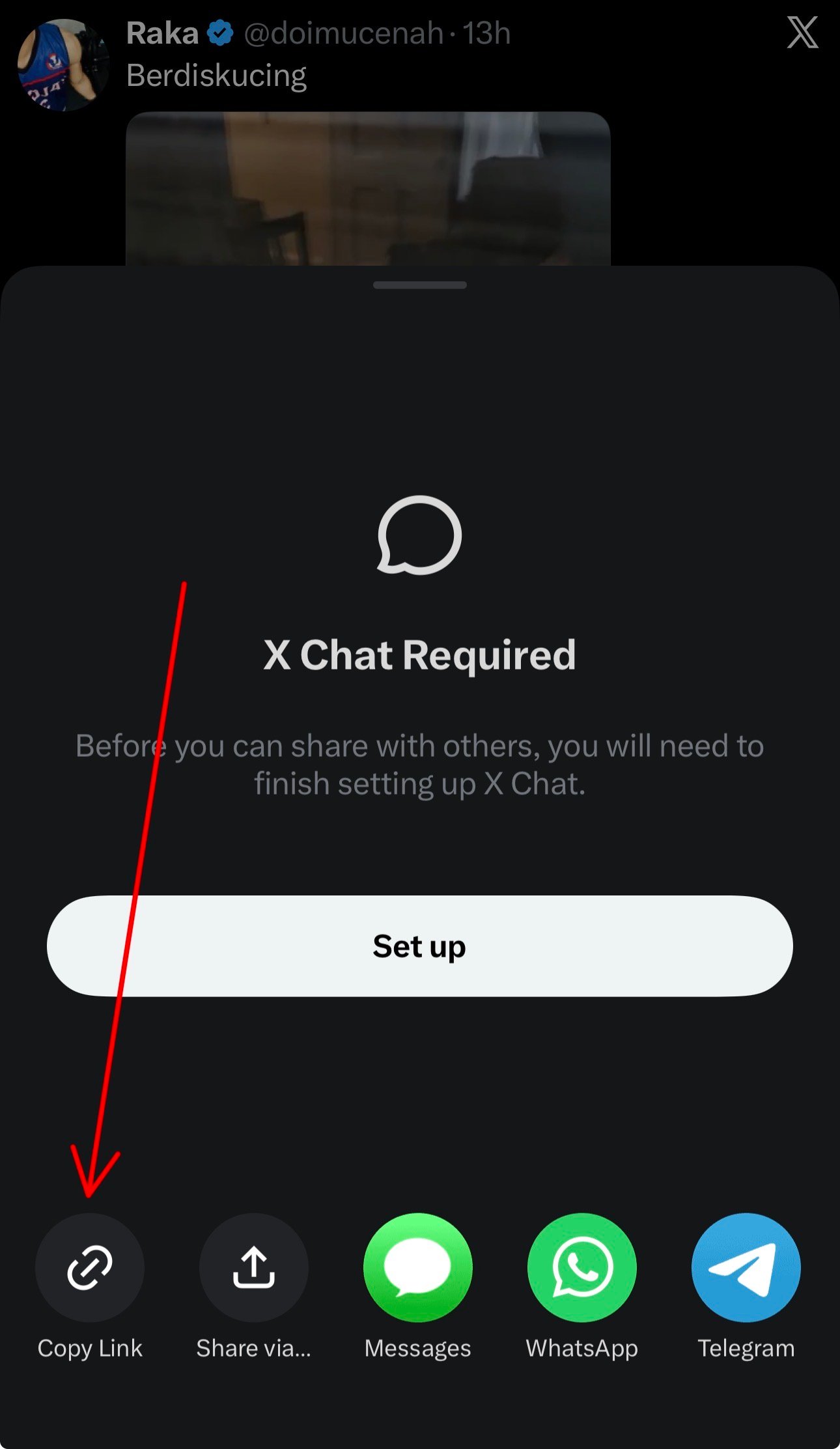
Скопируйте ссылку на твит.
Нажмите на значок «Поделиться» в твите и выберите Скопировать ссылкуили скопируйте URL-адрес непосредственно из адресной строки браузера. Оба варианта. twitter.com и x.com В этом инструменте все версии ссылки работают идентично.
Вставьте ссылку и нажмите «Получить видео».
Вставьте URL-адрес в поле ввода в верхней части этой страницы и нажмите Получить видеоВ течение нескольких секунд появляется предварительный просмотр видео, готовый к воспроизведению прямо в вашем браузере.

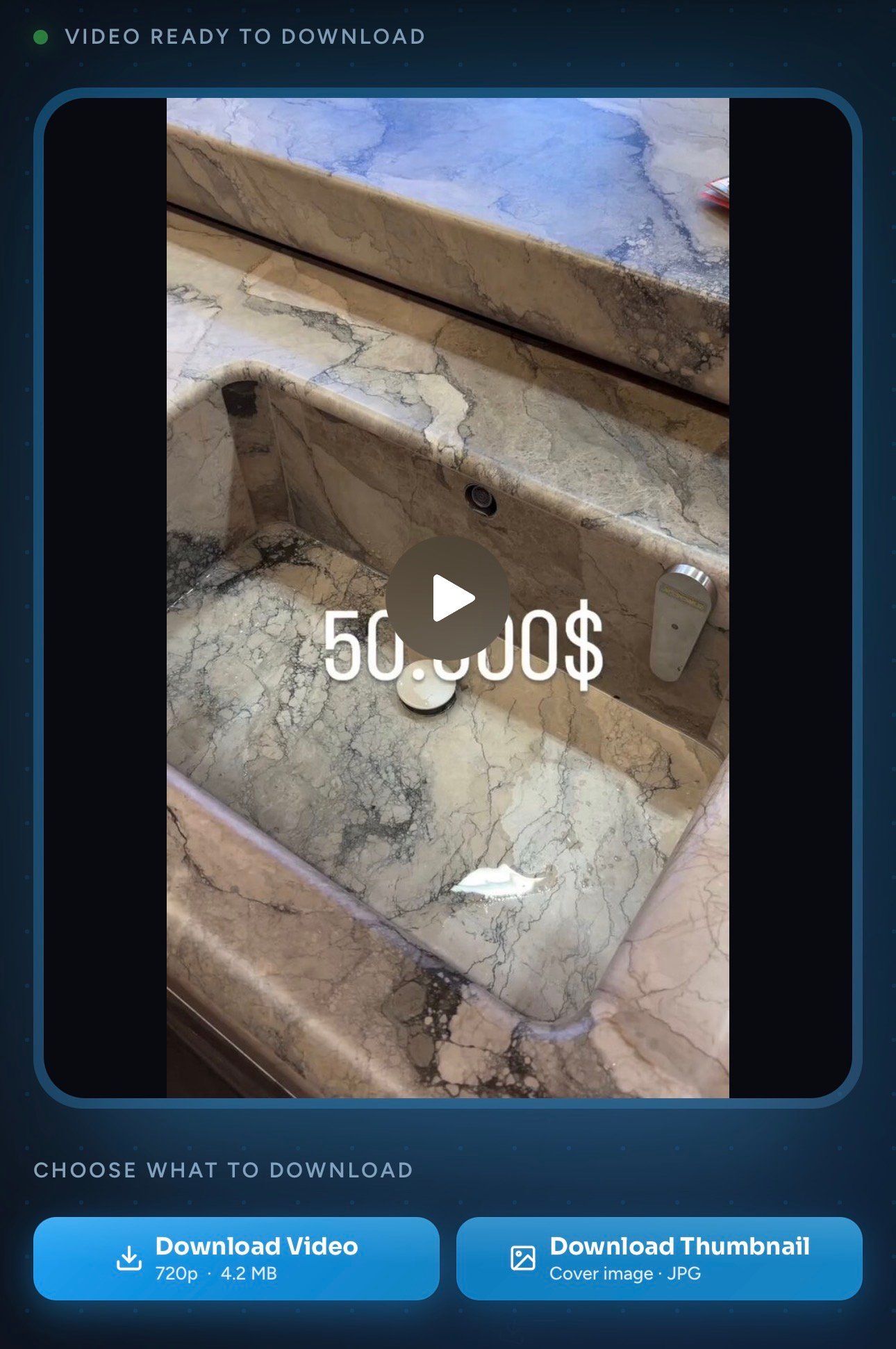
Нажмите «Скачать видео» или «Скачать миниатюру».
Использовать Скачать видео для исходного MP4-файла в максимально доступном качестве, или Скачать миниатюру Чтобы сохранить только обложку, оба файла попадают непосредственно в папку загрузок вашего устройства.
Преимущества использования этого загрузчика видео из Твиттера
Несколько мелких деталей, которые имеют большое значение по сравнению со среднестатистическим онлайн-инструментом.
Быстрая загрузка каждый раз
Сервер обрабатывает медиафайлы из Twitter за считанные секунды, даже при медленном Wi-Fi. Нет очереди и нет капчи.
Высочайшее доступное качество
Вы получаете оригинальное кодирование, выбранное загрузчиком — как правило, до 1080p, с четкими цветами и оригинальным звуком.
Вход или регистрация не требуются.
Никаких учетных записей, никакого сбора адресов электронной почты, никакой аутентификации OAuth. Откройте инструмент, вставьте текст, скачайте — вот и весь процесс.
Уважение к частной жизни
URL-адреса не регистрируются и не передаются третьим лицам. Инструмент не размещает файлы cookie для отслеживания и не требует никаких разрешений от браузера.
Также доступна загрузка миниатюр.
Нужно только изображение обложки для миниатюры или предварительного просмотра? Скачайте его одним щелчком мыши в виде чистого файла JPG/PNG.
Действительно безлимитно и бесплатно
Никаких дневных лимитов, никакого премиум-уровня, никаких неожиданных дополнительных платежей после нескольких использований. Создано один раз, бесплатно навсегда.
Чем отличается программа Toolizo для загрузки видео из Twitter?
Более наглядный способ сравнить возможности большинства сайтов для скачивания видео в интернете с тем, что предлагает Toolizo.
| Особенность | Тулизо | Типичные альтернативы |
|---|---|---|
| Прямая загрузка (без открытия в новой вкладке) | Да | Часто открывается в браузере |
| Оригинальное качество без перекодирования. | Всегда | Часто сжатый |
| Предварительный просмотр в браузере перед загрузкой | Да | Редко включается |
| Отдельная загрузка миниатюры | Встроенный | Не предлагается |
| Без регистрации, без дневных лимитов | По-настоящему бесплатно | Многочисленные особенности ворот |
| Поддерживает URL-адреса twitter.com и x.com. | Оба | Часто только один |
| Адаптивный пользовательский интерфейс, ориентированный на мобильные устройства. | Оптимизированный | Ощущение, как будто только на настольном компьютере |
| Никакого логирования или отслеживания URL-адресов. | Частная собственность по замыслу | Большинство запросов в журнале |
Примеры использования загрузчика видео из Twitter (с примерами)
Несколько практических ситуаций, в которых Toolizo x видео загрузчик Это действительно экономит время и усилия.
Сохранение фрагментов срочных новостей для справки.
Пример: Журналист, наблюдающий за прямым эфиром, видит на X видеоролик с показаниями очевидцев. Он вставляет ссылку в Toolizo, сохраняет MP4-файл в свой архив и ссылается на него позже в своих репортажах — даже если автор впоследствии удалит оригинальный твит.
Создание шаблонов для маркетинговых кампаний
Пример: Менеджер социальных сетей замечает высокоэффективный видеоролик в Твиттере от конкурента. Toolizo позволяет сохранить клип в HD-качестве, чтобы изучить стиль монтажа и структуру зацепки для следующей кампании — без необходимости записи экрана в более низком качестве.
Учителя встраивают короткие видеоролики в уроки.
Пример: Учитель истории находит минутный документальный ролик, размещенный на X. Он скачивает его через Toolizo и встраивает непосредственно в презентацию в классе, чтобы ролик работал в автономном режиме даже при отключении Wi-Fi в классе.
Создатели подтверждают свои собственные твиты
Пример: Создатель контента, публикующий видео непосредственно на X, хочет иметь локальную копию каждой своей публикации. Toolizo предоставляет им быстрый способ загрузки собственных видео для личного архива или для повторного использования на других платформах.
Юристы и исследователи, занимающиеся сохранением доказательств.
Пример: Исследователю необходимо сохранить видеозапись общедоступного твита для документирования. Сохранение файла через Toolizo создает стабильную локальную копию, которая не исчезнет, если учетная запись будет заблокирована или твит удален.
Дизайнеры захватывают кадры-миниатюры
Пример: Дизайнеру нужна обложка популярного видео X для создания мудборда. Вместо того чтобы сделать скриншот низкого качества, он использует... Скачать миниатюру кнопка для загрузки оригинального изображения плаката в полном разрешении.
Как получить больше пользы от этого загрузчика видео из Твиттера
Небольшие привычки, которые превращают одноразовый инструмент для скачивания в повседневный рабочий процесс.
Добавьте страницу в закладки. Самый быстрый способ скачать видео из твита — держать эту вкладку доступной одним ярлыком. На мобильном устройстве добавьте её на главный экран — она откроется мгновенно, как приложение.
Используйте функцию «Поделиться таблицами», чтобы пропустить этап копирования. На iPhone или Android, находясь в приложении X и просматривая твит, нажмите Поделиться → Скопировать ссылкуЗатем вернитесь на эту страницу. Браузер обычно автоматически предложит вставить текст.
Используйте его в паре с остальными приложениями пакета Toolizo. Если вы работаете и с другими платформами, то аналогичный алгоритм действий применим ко всем основным социальным сетям — см. список соответствующих инструментов ниже.
Сохраняйте миниатюры для предварительного просмотра. Кнопка с миниатюрой идеально подходит для предварительного просмотра постов в блоге, идей для обложек на YouTube или в качестве дизайнерского решения — многие люди её упускают и вместо этого делают скриншоты.
- Совет 1. Длинные, сложные URL-адреса x.com с дополнительными параметрами отслеживания по-прежнему работают — Toolizo удаляет все ненужное.
- Совет 2. Если твит является частью цепочки сообщений, вам нужна только ссылка на конкретный твит, содержащий видео, а не на родительский твит.
- Совет 3. Оба
twitter.comиx.comВерсии ссылки работают одинаково — выберите ту, которую вы скопировали. - Совет 4. Если загрузка зависла, обновите страницу и попробуйте снова — наиболее распространенной причиной являются временные сбои в сети.
Кто использует программу Toolizo для загрузки видео из Twitter?
От обычных пользователей, просматривающих ленту, до работающих профессионалов — один и тот же инструмент подходит для множества рабочих процессов.
Обычные пользователи X
Большинство людей просто хотят сохранить забавный ролик, видео с празднованием гола, видео с рецептом или памятный момент, опубликованный кем-то, на кого они подписаны, — без необходимости записывать экран в низком качестве.
Менеджеры и маркетологи социальных сетей
Маркетинговые команды собирают видеоролики конкурентов и сравнительные данные, сохраняют реакции на бренд и архивируют твиты, связанные с кампанией, для внутренних обзоров эффективности и составления отчетов.
Журналисты и исследователи
Съемочные группы сохраняют видеозаписи очевидцев, публичные заявления и вирусные ролики до того, как они будут удалены, отредактированы или сняты с публикации автором, сохраняя их в качестве исходной документации.
Учителя, тренеры и студенты
Преподаватели встраивают короткие, актуальные видеоролики в уроки, проводимые в офлайн-режиме, а студенты скачивают обучающие материалы и пояснения, чтобы просматривать их в удобном для них темпе.
Создатели и редакторы
Создатели контента делают резервные копии своих видеороликов на платформе X, а редакторы используют Toolizo для поиска референсных клипов для вдохновения, создания мудбордов или перепрофилирования коротких видеороликов на других платформах.
Часто задаваемые вопросы о программе для скачивания видео из Twitter
Четкие ответы на десять наиболее распространенных вопросов по этой теме. x видео загрузчик.
Да. Toolizo на 100% бесплатен, без платного уровня, без ограничений на количество загрузок в день и без регистрации. Оба варианта бесплатны. twitter.com и x.com Поддерживаются URL-адреса, и для обычного личного использования нет ограничений по количеству запросов.
Да. После ребрендинга Twitter в X формат URL изменился на x.com, но старые ссылки twitter.com по-прежнему работают везде. Toolizo принимает оба формата, а также ссылки mobile.twitter.com и короткие ссылки t.co.
Нет. Toolizo получает видео только из публичный твиты. Защищенные учетные записи требуют доступа на основе авторизации, который ни один сторонний инструмент — включая этот — не должен иметь возможности обойти.
Вы всегда получаете максимально возможное качество, предоставленное автором исходного файла — обычно 720p или 1080p. Файл представляет собой оригинальный MP4 без перекодирования, поэтому цвет и звук остаются идентичными тому, что воспроизводится в приложении X.
Нет. Toolizo никогда не добавляет брендинг, логотипы или водяные знаки к вашему видео. Все, что изначально было встроено в видео, остается неизменным, но этот инструмент ничего не добавляет.
Да. Интерфейс разработан с учетом мобильных устройств и работает в Safari, Chrome, Firefox, Edge и Brave. На iOS файл размещается внутри... Файлы или в папку «Загрузки», а затем вы сможете переместить его в «Фотографии» одним касанием.
Toolizo принудительно запускает настоящую загрузку через потоковый прокси. Если iOS по-прежнему открывает его в Safari, нажмите и удерживайте кнопку загрузки. Скачать видео кнопка и выберите Скачать связанный файл — файл сохранится в приложении «Файлы», а не откроется как проигрыватель.
Нет. Отправленный вами URL-адрес обрабатывается в памяти и немедленно удаляется. Нет базы данных ваших прошлых загрузок, нет аналитики по самим URL-адресам, и никакие сторонние трекеры не считывают ваши данные.
Да, именно для этого и предназначена вторая кнопка. Скачать миниатюру Действие сохраняет изображение обложки в формате JPG/PNG высокого разрешения, идеально подходящем для предварительного просмотра, заголовков блогов или в качестве образца для дизайна.
Сам инструмент предназначен для загрузки общедоступного контента для личного, некоммерческого использования. Возможность переиздания или распространения конкретного видео зависит от прав первоначального автора и применимого авторского права. Всегда указывайте авторов и запрашивайте разрешение на коммерческое использование.
Устранение неполадок в работе программы для загрузки видео из Twitter.
Быстрые решения наиболее распространенных проблем, с которыми сталкиваются пользователи при первом использовании программы для скачивания видео.
«Неверный URL» или «Не ссылка на Twitter»
Убедитесь, что ссылка начинается с https://twitter.com/ или https://x.com/ и содержит /статус/ Затем следует числовой идентификатор твита. URL-адреса профилей, страницы с хэштегами и ссылки на результаты поиска не содержат видео и не будут работать.
В твите говорится: «Нет форматов для скачивания».
Обычно это означает, что аккаунт защищен, твит удален или в публикации никогда не было видео (например, только встроенная ссылка на YouTube). Сначала откройте ссылку в приватном окне — если твит там не загружается, ни один сторонний инструмент не сможет его получить.
iPhone открывает видео в Safari.
В iOS иногда воспроизводятся файлы MP4 вместо их сохранения. Для этого нужно долго удерживать кнопку. Скачать видео кнопка и выбрать Скачать связанный файлЗатем файл появляется в приложении «Файлы», и оттуда вы можете переместить его в приложение «Фотографии» одним касанием.
Загрузка зависает или происходит медленно.
Медленные сети, корпоративные VPN и блокировщики рекламы, которые агрессивно переписывают URL-адреса медиафайлов, могут прерывать потоковое воспроизведение через прокси. Отключите VPN, на время переключитесь на мобильные данные или добавьте эту страницу в белый список вашего блокировщика, а затем попробуйте снова.
Предварительный просмотр размыт, но вам нужно HD-качество.
Предварительный просмотр на странице намеренно транслируется с более низким битрейтом для экономии полосы пропускания. Фактическое изображение Скачать видео Кнопка всегда выбирает максимально доступное качество — обычно 720p или 1080p — независимо от того, как выглядит предварительный просмотр.
Сетевая ошибка постоянно появляется
Обновите страницу один раз. Если проблема сохраняется, попробуйте другой браузер (Chrome, Firefox или Safari) и отключите все расширения браузера, взаимодействующие с X или Twitter. Большинство сетевых ошибок вызваны устаревшими токенами, которые мгновенно устраняются при принудительном обновлении страницы.
Рекомендации по загрузке X-видео
Несколько небольших привычек каждый раз делают этот процесс более приятным. Всегда копируйте ссылку непосредственно из твита.Не из цитируемого твита или ответа, потому что некоторые цитируемые твиты ссылаются на видео, которые они на самом деле не размещают. Избегайте загрузки файлов в режиме инкогнито на iOS. Если вы хотите, чтобы файлы автоматически попадали в «Фотографии», — Safari иногда блокирует сохранение файлов в приватном режиме. А если автор активно публикует контент, подождите минуту-две перед загрузкой твита; для загрузки новых файлов иногда требуется некоторое время, чтобы CDN X завершил обработку варианта с самым высоким разрешением.
Заключение
Почему этот загрузчик видео из Твиттера заслуживает постоянного места в вашем браузере.
Тулизо загрузчик видео из Твиттера Этот сервис создан с единственной целью: сделать сохранение видео из твита самой скучной, предсказуемой и надежной частью вашего дня. Никаких фальшивых кнопок загрузки, никаких скрытых подписок, никаких всплывающих окон с запросами уведомлений — просто вставьте, просмотрите и скачайте.
Будь вы обычный пользователь, желающий сохранить забавный ролик, журналист, сохраняющий видеозапись, сделанную очевидцем, создатель контента, делающий резервные копии своих публикаций, или маркетолог, изучающий высокоэффективный контент, это приложение подойдет вам. x видео загрузчик Обеспечивает неизменно высокое качество работы. Работает на любом устройстве, на twitter.com и x.com, и по своей сути уважает вашу конфиденциальность.
Добавьте эту страницу в закладки, поделитесь ею с другом, который постоянно спрашивает, как сохранять твиты, и изучите остальные инструменты Toolizo, ссылки на которые приведены ниже. Каждый инструмент Toolizo следует той же философии — быстро, бесплатно, с минимальным количеством рекламы и ориентировано на реального пользователя, а не на показатели на панели управления.
Подробнее на Toolizo
- ifunny Video Downloader — Скачивайте мемы, гифки и видео.
- Программа для скачивания миниатюр с YouTube — Скачайте миниатюру любого видео с YouTube в HD-качестве.
- Bitchute Video Downloader - Поддерживаются короткие видеоролики
- Конвертер SoundCloud в MP4
- Программа для просмотра историй в TikTok — смотрите истории в TikTok анонимно.
- Загрузчик видео с YouTube — Скачивайте любые видео с YouTube, короткие ролики и миниатюры в HD-качестве.
- Загрузчик видео с Pinterest — Скачивайте любые видео с Pinterest.
- Загрузчик видео с Facebook — Сохраняйте общедоступные видео и ролики Facebook в HD-качестве.
- Загрузчик видео из Snapchat — Легко скачивайте истории и видеоролики из раздела «В центре внимания» в Snapchat.
- Просмотр историй в Snapchat — Смотрите любые истории в Snapchat анонимно.
- Загрузчик видео из Instagram — Скачивайте любые видео из Instagram в HD-качестве.
- Просмотр историй в Instagram — Смотрите публичные истории в Instagram анонимно.
- Загрузчик постов из Instagram — Скачивайте общедоступные публикации и карусели в Instagram.
- Instagram в MP3 — Легко конвертируйте видео из Instagram в формат MP3.
- Скачать аватарку для Instagram — Скачайте фотографии профиля в Instagram в HD качестве.
- Программа для просмотра профилей в Instagram — Проанализируйте любой профиль в Instagram.
- Instagram All-in-One Downloader — Скачивайте любой контент из Instagram.
- Скачать фотографию профиля TikTok — Скачайте любую фотографию профиля из TikTok.
- Загрузчик видео из TikTok — Скачивайте любые видео из TikTok в HD-качестве.
- Все инструменты Toolizo — Просмотрите все бесплатные инструменты для работы с социальными сетями.
- Блог Toolizo — Руководства, советы и новости из социальных сетей.
Внешние ссылки
Тулизо загрузчик видео из Твиттера Данная услуга предоставляется исключительно для загрузки общедоступного контента в личных, некоммерческих целях. Пользователи несут полную ответственность за то, как используется загруженный контент.
Загрузка и распространение защищенных авторским правом видеороликов без разрешения их создателя может являться нарушением авторских прав. Условия предоставления услуг X и применимым законам об авторском праве. Всегда указывайте автора оригинального произведения и запрашивайте разрешение перед коммерческим использованием. Toolizo не связан, не поддерживается и не имеет отношения к X Corp., Twitter или любым их дочерним компаниям.
Готов к Скачать ваше первое видео X?
Вставьте ссылку на свой Twitter или статус в X-Show выше — это займет меньше десяти секунд. Регистрация не требуется. Всегда бесплатно.
Начните загрузку — это бесплатно!