
Downloading…
Your file is downloading, please wait...
Free Twitter Video Downloader
Save X Videos in HD Quality
Paste any Twitter or X (twitter.com / x.com) status link, preview the video, and download it directly to your device — fast, free, and without watermarks.
About This Tool
Toolizo's Twitter video downloader is a fast, browser-based utility that pulls clean MP4 files from any public tweet on twitter.com or x.com. No account, extension, or technical skill required — paste a status link, watch the live preview, and download. Within seconds the video lands directly on your phone, tablet, or computer.
X's user numbers have been genuinely uncertain since the platform stopped publishing official usage data after 2022, independent estimates for 2026 range from roughly 557 million to 611 million monthly active users, with daily active figures between 237 and 251 million depending on the source and methodology (DemandSage; GetAFollower; SQ Magazine, 2026).
What's more consistently reported: posts containing video see substantially higher engagement than text-only posts; recent estimates put it at up to 10x, a sharp increase from around 2.5x in earlier data (SQ Magazine, 2026), which is exactly the kind of content this tool is built to save before it disappears from a feed.
The tool handles every modern URL shape X uses today: twitter.com/<user>/status/<id>, x.com/<user>/status/<id>, mobile.twitter.com links, and short t.co redirects shared inside DMs or on other platforms. Two clean download options appear after fetching: the video file in the highest quality available, and the thumbnail.
The download triggers through a streaming proxy, so the file saves directly to your device like a normal file, rather than opening in a new tab where the browser might just play it instead.
Every request is processed in real time, parsed and validated, and routed through a server-side proxy that handles HTTP Range requests, which is what makes smooth in-browser scrubbing possible, along with a real "Save to device" action instead of an endless-playing tab.
Every X Video Format
Standard tweet videos, replies, quote tweets, news clips, sports highlights, and clips embedded inside threads — all supported on both twitter.com and x.com.
Best Quality, No Watermark
Files are delivered in their native resolution, typically 720p or 1080p depending on what the original poster uploaded, without any added Toolizo branding.
Privacy by Default
Your URL is processed in real time and discarded immediately. Toolizo does not log status links, IP addresses, or any personally identifiable information.
Works on Every Device
iPhone, Android, iPad, Windows, macOS, Linux, anything with a browser. No app to install, no permissions to grant, no plugin to enable.
How to Use This Twitter Video Downloader
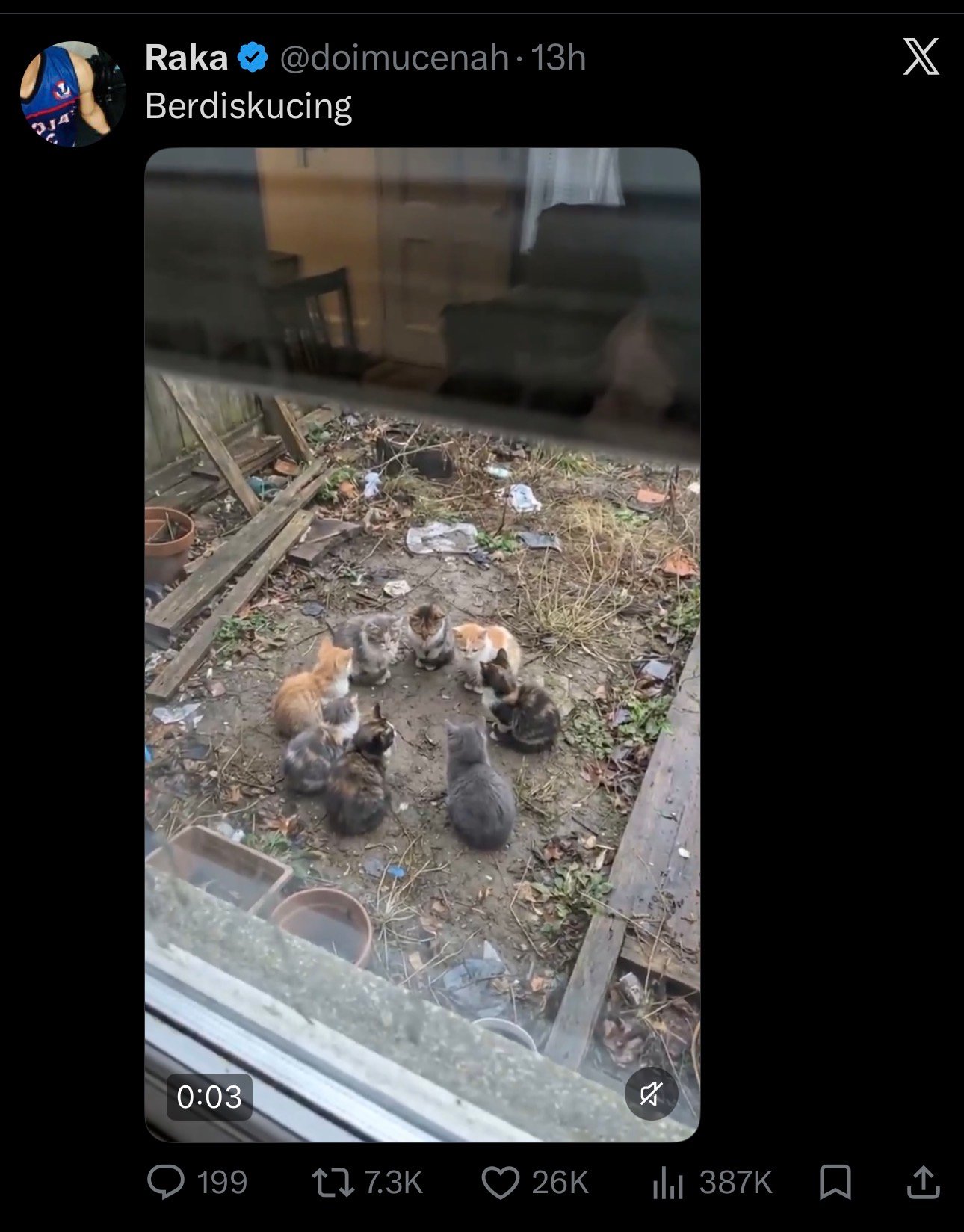
Open the Tweet on Twitter or X
Find the public tweet containing the video you want to save on twitter.com, x.com, or inside the official mobile app. The post needs to be visible without logging in; protected accounts aren't supported by any third-party tool.
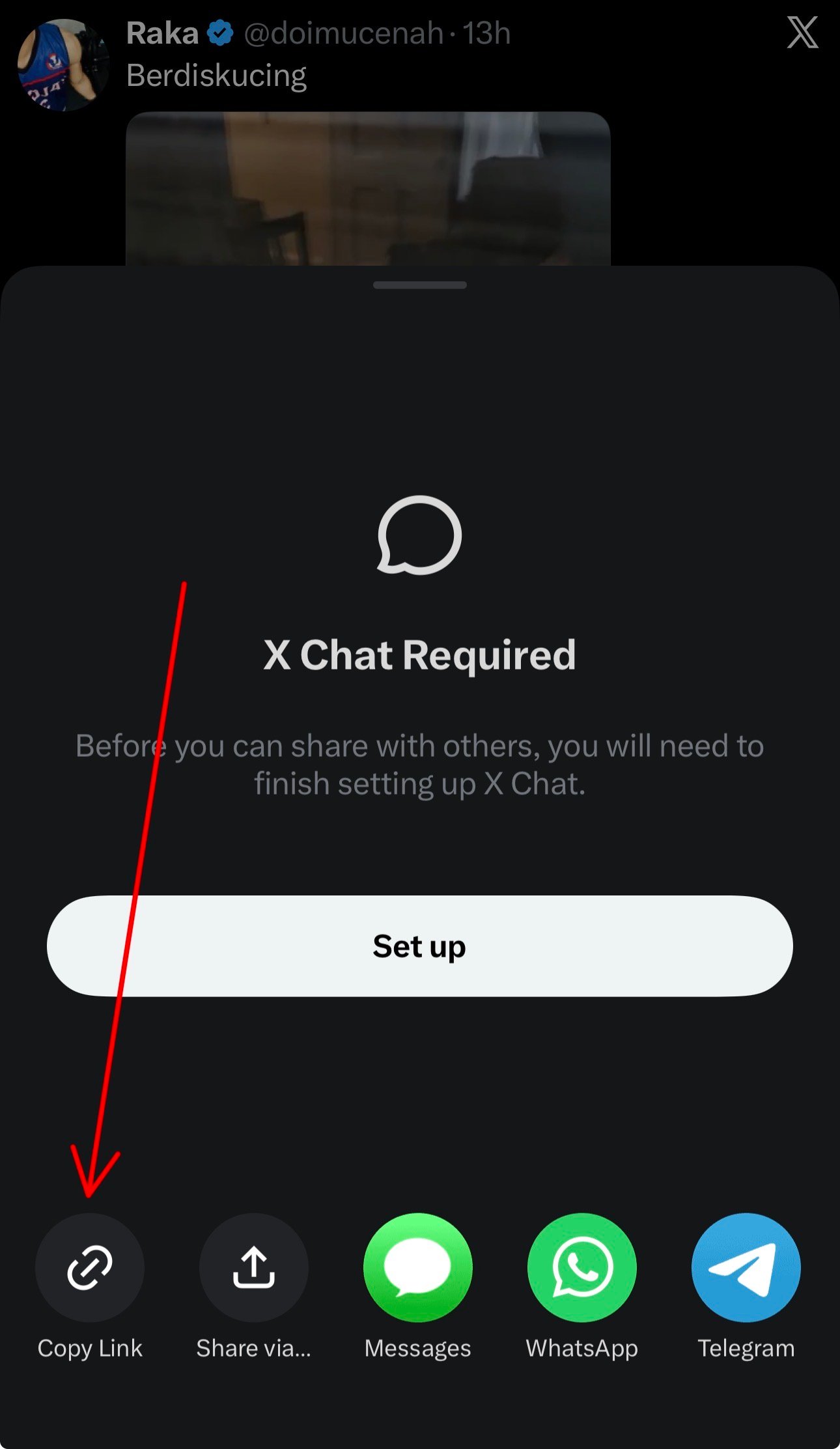
Copy the Tweet's Link
Tap the share icon and choose Copy link, or copy the URL directly from your browser's address bar. Both twitter.com and x.com versions work identically.
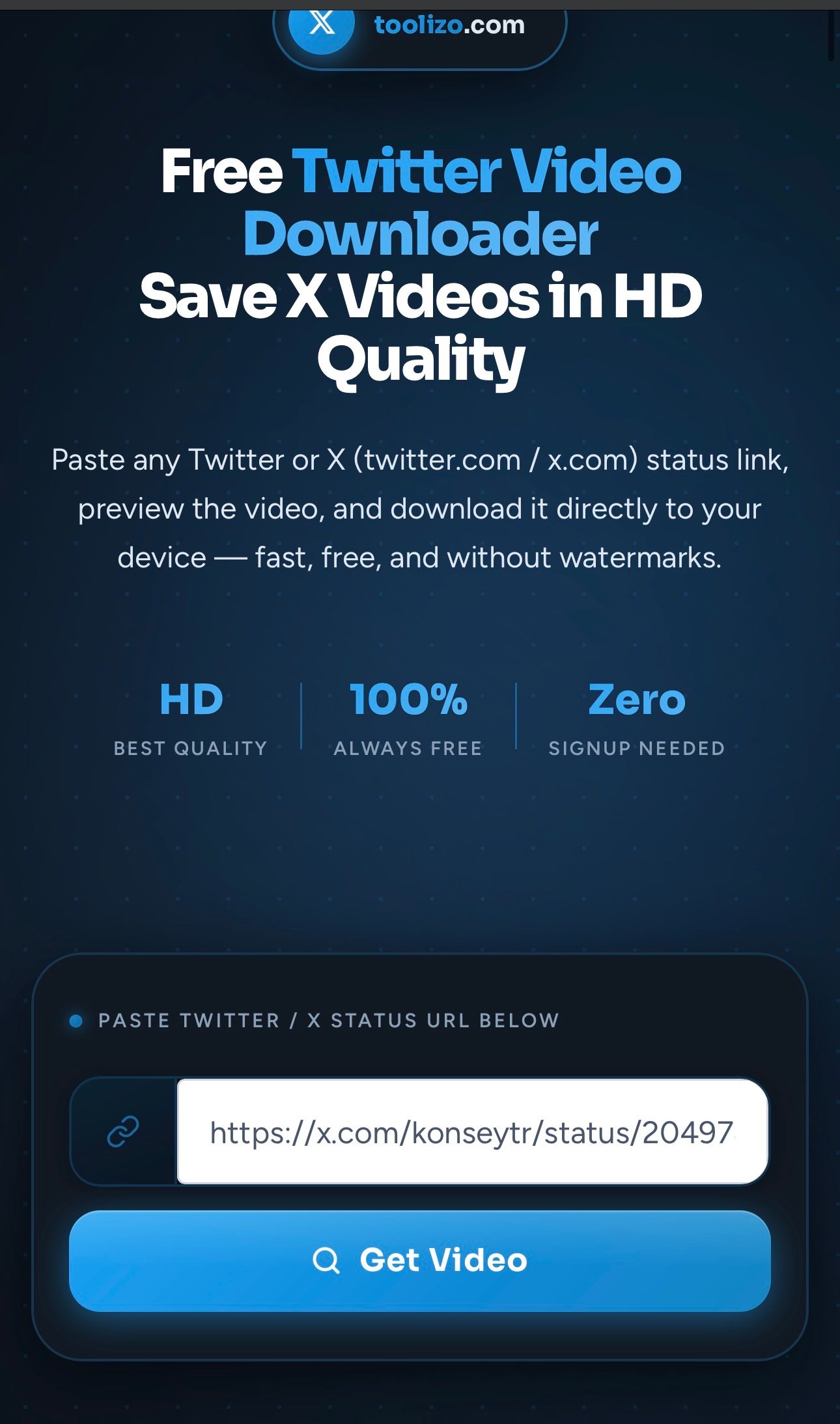
Paste the Link and Click Get Video
Paste the URL into the input box and hit Get Video. A live preview appears within a few seconds, playable directly inside your browser.
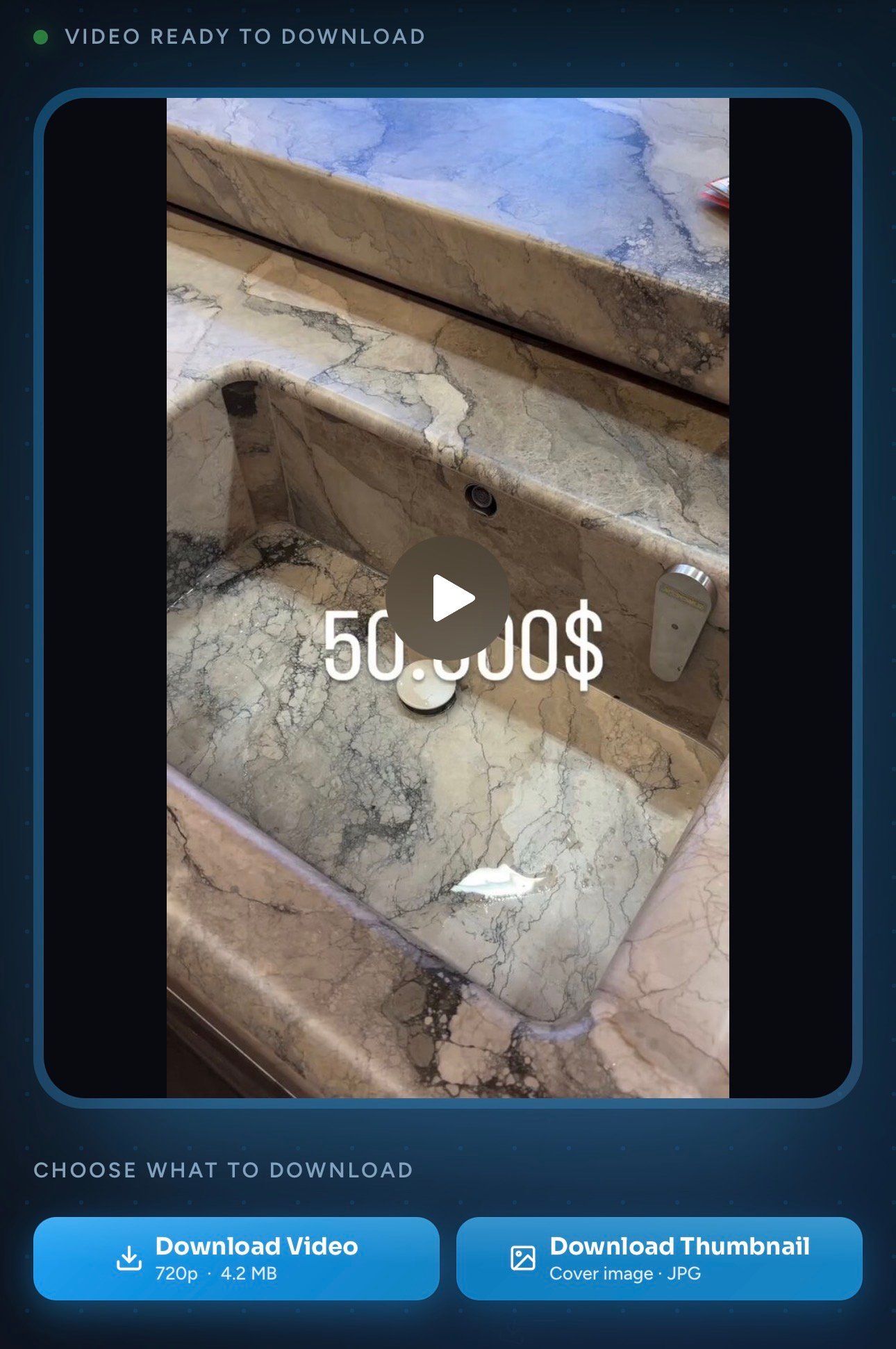
Tap Download Video or Download Thumbnail
Use Download Video for the original MP4 in the highest available quality, or Download Thumbnail to save just the cover image. Both land directly in your device's downloads folder.
Advantages of Using This Twitter Video Downloader
Fast Fetch Every Time
The backend resolves X's media in seconds, even on slow Wi-Fi, with no queue and no captcha.
Highest Available Quality
The original encoding the uploader chose, typically up to 1080p, with original audio.
No Login or Signup
No accounts, no email capture, no OAuth.
Privacy-Respecting
URLs aren't logged or shared, no tracking cookies, no browser permissions needed.
Thumbnail Download Too
Grab just the cover image in one click as a clean JPG/PNG.
Genuinely Unlimited and Free
No daily caps, no premium tier, no surprise paywall.
How Toolizo Is Different
| Feature | Toolizo | Typical alternatives |
|---|---|---|
| Direct download (no opening in new tab) | Yes | Often opens in browser |
| Original quality, no re-encoding | Always | Often compressed |
| Live in-browser preview before download | Yes | Rarely included |
| Separate thumbnail download | Built-in | Not offered |
| No signup, no daily limits | Truly free | Many gate features |
| Supports twitter.com and x.com URLs | Both | Often only one |
| No URL logging or tracking | Private by design | Most log requests |
Use Cases
Saving Breaking News Clips for Reference
Example: a journalist watching a live event sees a public eyewitness clip on X, saves the MP4 through Toolizo, and references it later in reporting, even if the original tweet is deleted afterward.
Building a Swipe File for Marketing Campaigns
Example: a social media manager spots a high-performing video tweet from a competitor and saves it in HD to study the editing style and hook structure, without screen-recording at lower quality.
Teachers Embedding Short Clips in Lessons
Example: a history teacher downloads a one-minute documentary clip shared on X and embeds it in a classroom presentation, so it works offline even when classroom Wi-Fi fails.
Creators Backing Up Their Own Tweets
Example: a creator who posts videos directly to X downloads a local copy of every post for personal archives or repurposing on other platforms.
Researchers Preserving Public Evidence
Example: a researcher preserves a public tweet's video for documentation, creating a stable local copy that won't disappear if the account is suspended or the tweet removed.
Designers Grabbing Thumbnail Frames
Example: a designer wants the cover image of a popular X video for a moodboard, and uses Download Thumbnail to fetch the original poster image at full resolution instead of a low-quality screenshot.
Getting More From This Tool
- Bookmark the page, or add it to your phone's home screen for one-tap access.
- Use your device's share sheet (Share → Copy Link on the tweet) to skip manually finding the URL.
- Long, complicated x.com URLs with tracking parameters still work; Toolizo strips what it doesn't need.
- For a tweet inside a thread, you only need the link to the specific tweet with the video, not the parent tweet.
- Both twitter.com and x.com links work identically; use whichever you copied.
- If a download seems stuck, refresh and try again; temporary network glitches are the most common cause.
Who Uses This Tool
Everyday X Users
Saving a funny clip, a goal celebration, or a memorable moment posted by someone they follow, without screen-recording at low quality.
Social Media Managers and Marketers
Collecting competitor and benchmark videos, saving brand reactions, and archiving campaign-related tweets for internal reporting.
Journalists and Researchers
Saving eyewitness footage and viral clips before they're deleted or removed, preserving them for source documentation.
Teachers, Trainers, and Students
Embedding short clips into offline lessons, or downloading tutorial threads to revisit at their own pace.
Creators and Editors
Backing up their own X videos, or grabbing reference clips for inspiration and short-form repurposing.
Frequently Asked Questions
Yes. 100% free with no premium tier, no daily download cap, and no signup. Both twitter.com and x.com URLs are supported.
Yes. Old twitter.com links still work everywhere, and Toolizo accepts both formats, plus mobile.twitter.com and short t.co share links.
No. Toolizo only fetches videos from public tweets. Protected accounts require login-based access that no third-party tool should bypass.
The highest available quality the original poster uploaded, usually 720p or 1080p. The file is the original MP4 with no re-encoding.
No. Toolizo never adds branding, logos, or watermarks. Whatever the original creator embedded remains; nothing is added by this tool.
Yes. The interface works across Safari, Chrome, Firefox, Edge, and Brave. On iOS, the file lands in Files or your downloads folder, then can be moved to Photos with one tap.
Toolizo forces a true download via the streaming proxy. If iOS still opens it in Safari, long-press the Download Video button and choose Download Linked File; the file saves into Files instead of opening as a player.
Yes, the Download Thumbnail button saves the cover image as a high-resolution JPG/PNG, useful for previews or design references.
It's intended for downloading publicly available content for personal, non-commercial use. Whether you may republish or redistribute a specific video depends on the original creator's rights and applicable copyright law.
More on Toolizo
- ifunny Video Downloader — Download Memes, gifs and videos.
- YouTube Thumbnail Downloader — Download any youtube video Thumbnail in HD quality.
- Bitchute Video Downloader - Shorts Supported
- Soundcloud to Mp4 Converter
- TikTok Story Viewer - Watch TikTok Stories Anonymously
- YouTube Video Downloader — Download any youtube video, short & thumbnail in HD.
- Pinterest Video Downloader — Download any kind of pinterest video.
- Facebook Video Downloader — Save public Facebook videos and Reels in HD.
- Snapchat Video Downloader — Easily download Snapchat story & spotlight videos.
- Snapchat Story Viewer — Watch any Snapchat story anonymously.
- Instagram Video Downloader — Download any Instagram video in HD.
- Instagram Story Viewer — Watch public Instagram stories anonymously.
- Instagram Post Downloader — Download public Instagram posts & carousels.
- Instagram To Mp3 — Easily convert Instagram videos into MP3.
- Instagram PFP Download — Download Instagram profile pictures in HD.
- Profile Viewer For Instagram — Analyze any Instagram profile.
- Instagram All-in-One Downloader — Download any kind of Instagram content.
- TikTok Profile Picture Download — Download any TikTok profile picture.
- TikTok Video Downloader — Download any TikTok video in HD.
- All Toolizo Tools — Browse all free social media tools.
- Toolizo Blog — Guides, tips, and social media news.
External References
The Toolizo Twitter video downloader is provided strictly for downloading publicly available content for personal, non-commercial use. Users are solely responsible for how downloaded content is used.
Downloading and redistributing copyrighted videos without the creator's permission may violate X's Terms of Service and applicable copyright laws. Always credit the original creator and seek permission before commercial use. Toolizo is not affiliated with, endorsed by, or connected to X Corp., Twitter, or any of their subsidiaries.
Ready to Download Your First X Video?
Paste a Twitter or X status link above — it takes less than ten seconds. No signup. Always free.
Start Downloading — It's Free