











डाउनलोड हो रहा है…
आपकी फ़ाइल डाउनलोड हो रही है, कृपया प्रतीक्षा करें...
Free Pinterest वीडियो डाउनलोडर
एचडी में पिन और आइडिया पिन सेव करें
किसी भी Pinterest पिन लिंक या pin.it शॉर्ट यूआरएल को पेस्ट करें, प्रेरणा का पूर्वावलोकन करें और मूल MP4 या उच्च-रिज़ॉल्यूशन छवि को सीधे अपने डिवाइस पर सहेजें — कोई लॉगिन नहीं, कोई वॉटरमार्क नहीं, कोई झंझट नहीं।
टूलिज़ो पिंटरेस्ट वीडियो डाउनलोडर के बारे में
यह ऐप उन शिल्पकारों, योजनाकारों और रचनाकारों के लिए बनाया गया है जो लगातार ऐसे पिन ढूंढते रहते हैं जिन्हें वे अपने डिवाइस पर रखना चाहते हैं।
टूलिज़ो Pinterest वीडियो डाउनलोडर यह एक तेज़, ब्राउज़र-आधारित यूटिलिटी है जो किसी भी सार्वजनिक पिन को डाउनलोड करने योग्य फ़ाइल में बदल देती है — वीडियो पिन और आइडिया पिन के लिए साफ़ MP4 फ़ाइल, या इमेज पिन के लिए पूर्ण-रिज़ॉल्यूशन JPG/PNG फ़ाइल। इसमें कुछ भी इंस्टॉल करने की ज़रूरत नहीं है, Pinterest लॉगिन की आवश्यकता नहीं है, और आप कितनी प्रेरणाएँ सहेज सकते हैं, इस पर कोई मासिक सीमा नहीं है। पेस्ट करें, पूर्वावलोकन करें, डाउनलोड करें।
एक लचीले के रूप में पिन डाउनलोडरयह टूल Pinterest के हर तरह के URL को समझता है: डेस्कटॉप साइट से मिलने वाले लंबे pinterest.com/pin/ लिंक, pinterest.co.uk, pinterest.de, pinterest.fr, pinterest.com.au या pinterest.ca जैसे देश-विशिष्ट लिंक, और मोबाइल लिंक। pin.it/ Pinterest ऐप से कॉपी किए गए कोड और किसी के बोर्ड में मौजूद पिन के डायरेक्ट डीप-लिंक शेयर करें। आप जो भी पेस्ट करेंगे, Toolizo उसके पीछे की मूल मीडिया फ़ाइल को पहचान लेगा।
डाउनलोड करने के बाद दो साफ़ डाउनलोड बटन दिखाई देते हैं: एक उपलब्ध उच्चतम गुणवत्ता में वीडियो फ़ाइल (या स्रोत छवि यदि पिन केवल छवि है), और एक इसके लिए थंबनेल / कवर छविकोई नकली डाउनलोड लिंक नहीं, कोई पॉपअप नहीं, कोई पांच सेकंड की उलटी गिनती नहीं। असली फ़ाइल सीधे आपके डिवाइस के डाउनलोड फ़ोल्डर में स्ट्रीमिंग प्रॉक्सी के ज़रिए पहुँचती है जो HTTP रेंज अनुरोधों को संभालता है — यही वह तकनीकी विशेषता है जो डाउनलोड को असली फ़ाइलों की तरह काम करने देती है, न कि ब्राउज़र द्वारा बार-बार चलाने की कोशिश किए जाने वाले टैब के रूप में खुलने देती है।
सरल इंटरफ़ेस के पीछे, यह टूल इस बात को ध्यान में रखकर बनाया गया है कि Pinterest पर सामग्री वास्तव में कैसे काम करती है। Pinterest लंबे समय तक काम आने वाली प्रेरणाओं का स्रोत है: कोई रेसिपी जिसे आप तीन हफ्ते बाद बनाएंगे, कोई पेंट का रंग जिसे आप अगले महीने किसी कमरे में आज़माएंगे, या शादी का कोई सेंटरपीस जिसे आप सिर्फ एक बार बनाएंगे। इन पिन्स को किसी स्थानीय फ़ोल्डर में सहेजना - किसी बोर्ड पर भरोसा करने के बजाय कि उसे कभी संपादित नहीं किया जाएगा या किसी निर्माता द्वारा पिन को कभी न हटाने के बजाय - एक ऐसे विचार के बीच का अंतर है जिसे आप वास्तव में उपयोग करेंगे और एक ऐसा विचार जो चुपचाप गायब हो जाएगा। यह टूल इसी अंतर को पाटने के लिए बनाया गया है।
हर Pinterest पिन प्रारूप
स्टैंडर्ड वीडियो पिन, मोशन-रिच आइडिया पिन, स्टोरी पिन, एनिमेटेड जीआईएफ और स्टैटिक हाई-रिज़ॉल्यूशन इमेज - ये सभी pinterest.com और सभी क्षेत्रीय डोमेन पर समर्थित हैं।
असली क्वालिटी, कोई वॉटरमार्क नहीं
फाइलें उसी एन्कोडिंग में डिलीवर की जाती हैं जिसमें क्रिएटर ने उन्हें अपलोड किया था — आमतौर पर वीडियो के लिए 720p या उससे अधिक, और इमेज पिन के लिए पूर्ण-रिज़ॉल्यूशन JPG/PNG — बिना Toolizo ब्रांडिंग के।
गोपनीयता डिफ़ॉल्ट रूप से
आपके पिन यूआरएल की प्रक्रिया तुरंत की जाती है और उसे तुरंत हटा दिया जाता है। Toolizo पिन लिंक, आईपी पते या किसी भी व्यक्तिगत रूप से पहचान योग्य जानकारी को लॉग नहीं करता है।
यह हर डिवाइस पर काम करता है
iPhone, Android, iPad, Windows, macOS, Linux — ब्राउज़र वाला कोई भी डिवाइस। कुछ भी इंस्टॉल करने की ज़रूरत नहीं, Pinterest को कोई अनुमति देने की ज़रूरत नहीं, कोई एक्सटेंशन चालू करने की ज़रूरत नहीं।
इस Pinterest वीडियो डाउनलोडर का उपयोग कैसे करें
चार आसान चरण — कॉपी करने से लेकर डाउनलोड करने तक तीस सेकंड से भी कम समय लगता है।
Pinterest पर पिन खोलें
Pinterest ऐप में, pinterest.com पर, या किसी भी देश-विशिष्ट साइट जैसे pinterest.co.uk या pinterest.de पर वह पिन ढूंढें जिसे आप सहेजना चाहते हैं। इमेज पिन, वीडियो पिन और आइडिया पिन सभी समर्थित हैं - केवल निजी प्रोफ़ाइल से संरक्षित बोर्ड पिन ही नहीं चुने जा सकते।
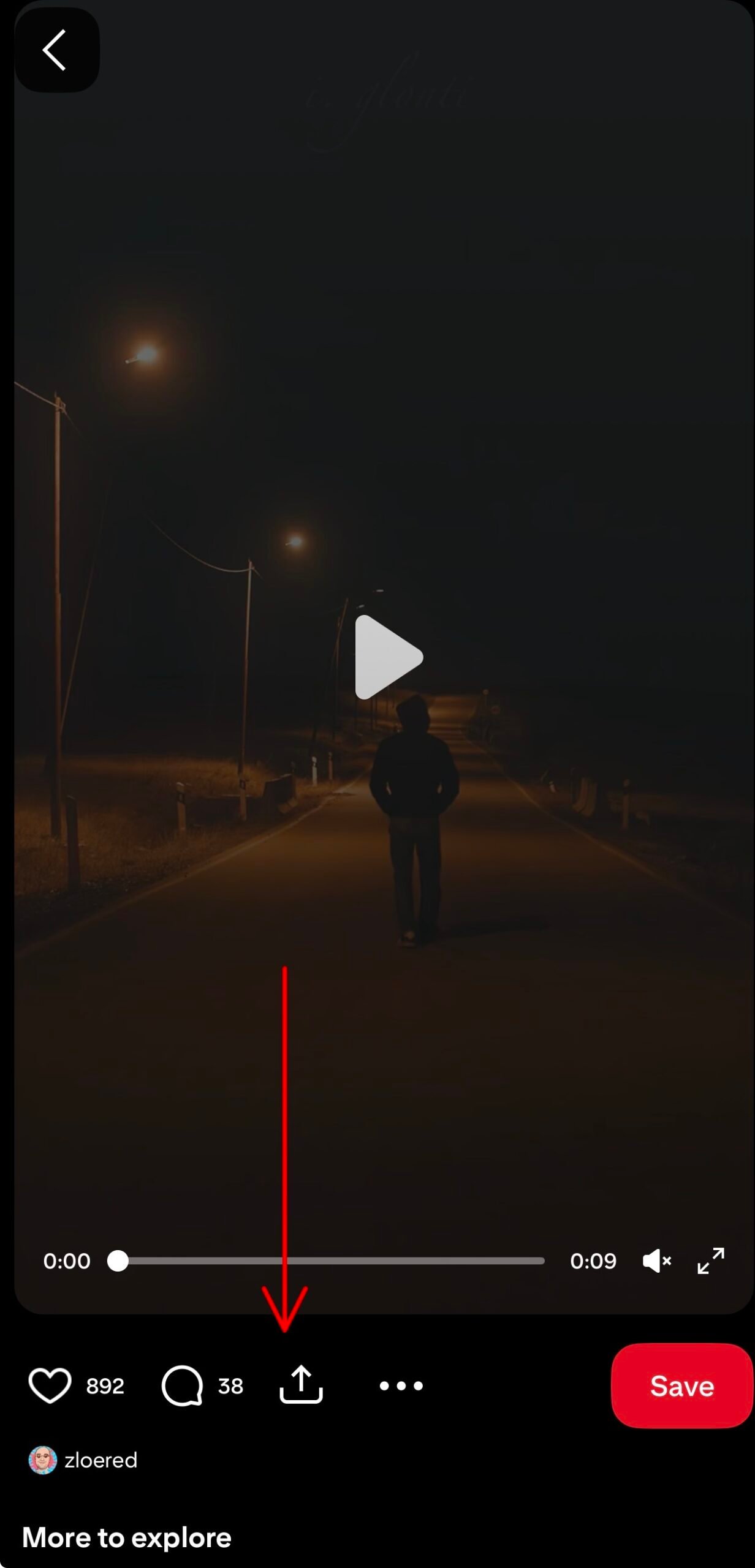
पिन का लिंक कॉपी करें
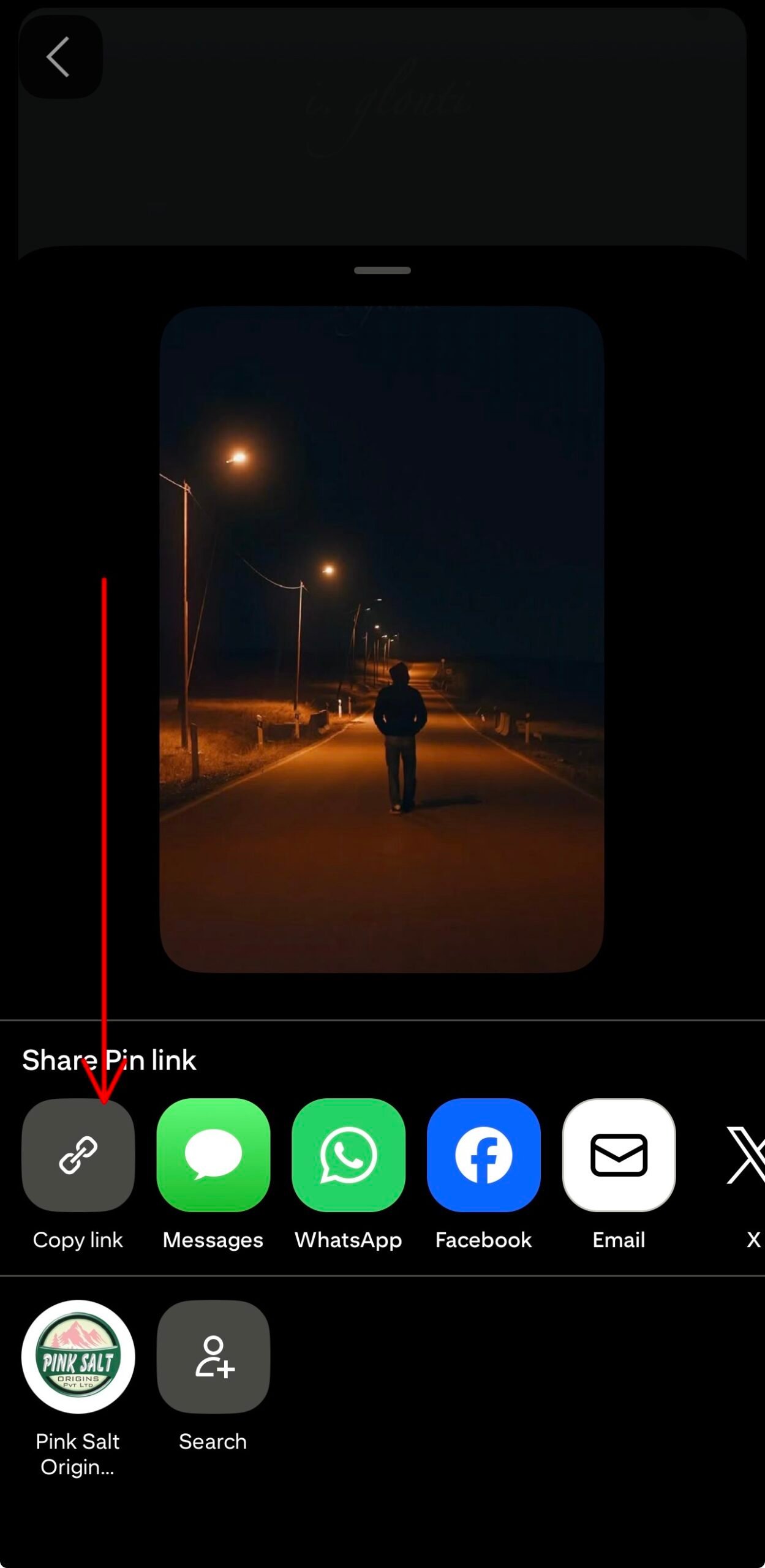
पिन पर टैप करें भेजना → लिंक की प्रतिलिपि करें मोबाइल ऐप में, या डेस्कटॉप पर शेयर आइकन का उपयोग करें। दोनों ही तरीके लंबे हैं। pinterest.com/pin/... यूआरएल और संक्षिप्त इसे पिन करें/... इस टूल के अंदर शेयर कोड एक समान रूप से काम करते हैं, इसलिए Pinterest द्वारा दिए गए किसी भी कोड का उपयोग करें।
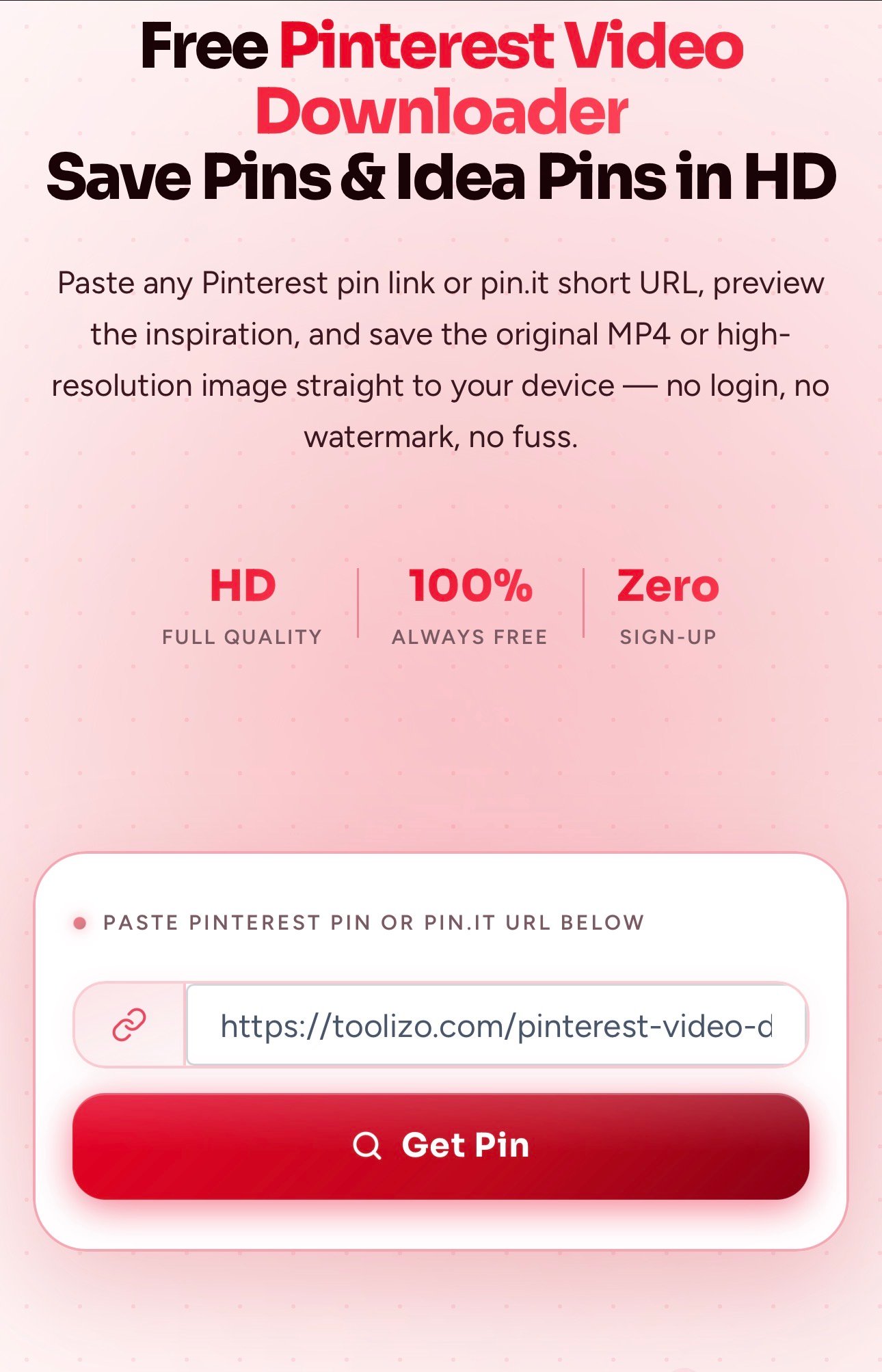
लिंक पेस्ट करें और गेट पिन पर टैप करें
इस पेज के ऊपर दिए गए बॉक्स में URL पेस्ट करें और एंटर दबाएं। पिन प्राप्त करेंवीडियो या छवि का लाइव पूर्वावलोकन कुछ ही सेकंड में दिखाई देता है - वीडियो पिन के लिए, आप डाउनलोड करने का निर्णय लेने से पहले सीधे ब्राउज़र के अंदर क्लिप को स्क्रॉल कर सकते हैं।
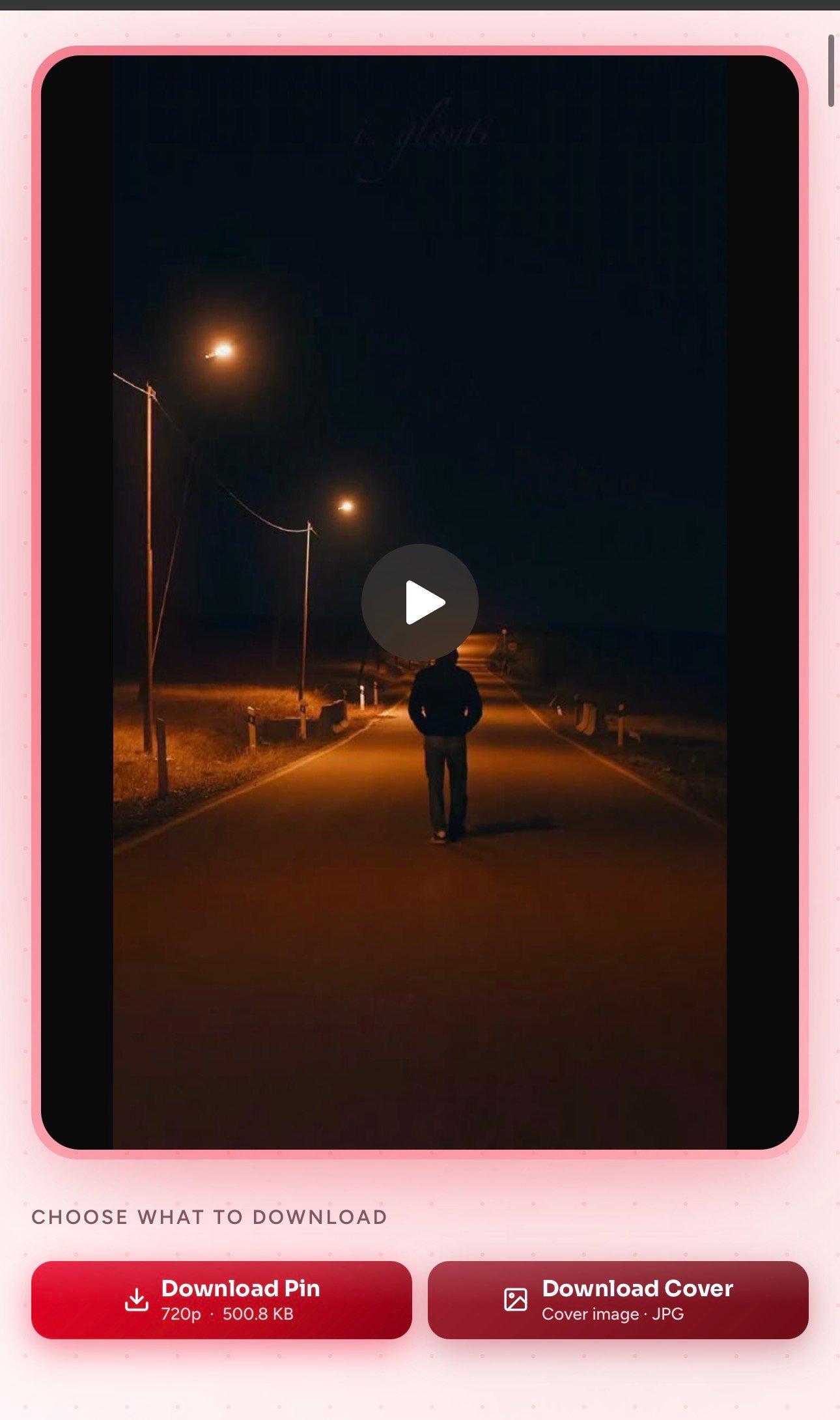
डाउनलोड पिन या डाउनलोड कवर पर टैप करें
उपयोग पिन डाउनलोड करें मूल एमपी4 (या पूर्ण आकार की छवि) के लिए उच्चतम उपलब्ध गुणवत्ता में, या कवर डाउनलोड करें केवल कवर फ्रेम की स्थिर छवि को जेपीजी फ़ाइल के रूप में सहेजें। दोनों फ़ाइलें सीधे आपके डिवाइस के डाउनलोड फ़ोल्डर में पहुँच जाएँगी, और ऑफ़लाइन उपयोग के लिए तैयार होंगी।
इस Pinterest वीडियो डाउनलोडर का उपयोग करने के लाभ
कुछ छोटी-छोटी बातें जो औसत पिन सेवर की तुलना में उल्लेखनीय अंतर पैदा करती हैं।
वास्तव में तेज़ सामान लाना
इसका बैकएंड धीमे वाई-फाई पर भी कुछ ही सेकंड में Pinterest मीडिया को प्रोसेस कर देता है। इसमें कोई कतार नहीं है, कोई कैप्चा नहीं है और डाउनलोड के बीच पांच सेकंड का इंतजार भी नहीं करना पड़ता।
उपलब्ध सर्वोत्तम गुणवत्ता
आपको पिनर द्वारा अपलोड की गई मूल एन्कोडिंग प्राप्त होती है - आमतौर पर 1080p तक के वीडियो और पूर्ण-रिज़ॉल्यूशन वाली छवियां - जिसमें मूल ऑडियो ट्रैक बरकरार रहता है।
लॉगिन या साइनअप की आवश्यकता नहीं है
Pinterest अकाउंट की कोई ज़रूरत नहीं, ईमेल कैप्चर की कोई ज़रूरत नहीं, OAuth हैंडशेक की कोई ज़रूरत नहीं। पेज खोलें, पेस्ट करें, डाउनलोड करें — बस यही पूरी प्रक्रिया है।
निजता का सम्मान करने वाला
पिन किए गए यूआरएल को न तो लॉग किया जाता है, न बेचा जाता है और न ही साझा किया जाता है। यह टूल कोई ट्रैकिंग कुकी सेट नहीं करता है और न ही ब्राउज़र से क्लिपबोर्ड या नोटिफिकेशन की अनुमति मांगता है।
कवर इमेज भी डाउनलोड करें
क्या आपको मूडबोर्ड, ब्लॉग हेडर या प्रिंट करने योग्य संदर्भ के लिए केवल कवर फ्रेम की आवश्यकता है? इसे एक क्लिक में साफ JPG/PNG फ़ाइल के रूप में सेव करें, स्क्रीनशॉट लेने की कोई ज़रूरत नहीं है।
पूरी तरह से असीमित और मुफ़्त
कोई दैनिक सीमा नहीं, कोई प्रीमियम स्तर नहीं, कुछ डाउनलोड के बाद कोई छिपा हुआ भुगतान नहीं। चाहे आप पाँच पिन बचाएँ या पाँच सौ – अनुभव एक जैसा ही रहेगा।
टूलिज़ो पिंटरेस्ट डाउनलोडर कैसे अलग है?
यह देखने का एक स्पष्ट तरीका है कि अधिकांश रैंडम पिन-सेवर साइटें आपको क्या देती हैं और टूलिज़ो क्या प्रदान करता है।
| विशेषता | टूलिज़ो | सामान्य विकल्प |
|---|---|---|
| सीधा डाउनलोड (फ़ाइल वास्तव में सेव हो जाती है) | हाँ | अक्सर नए टैब में खुलता है |
| बिना री-एनकोडिंग के मूल गुणवत्ता | हमेशा | अक्सर संपीड़ित |
| डाउनलोड करने से पहले ब्राउज़र में लाइव पूर्वावलोकन देखें | हाँ | शायद ही कभी शामिल किया गया |
| कवर इमेज अलग से डाउनलोड करें | में निर्मित | पेशकश नहीं की गई |
| आइडिया पिन सपोर्ट (मल्टी-फ्रेम वीडियो पिन) | हाँ | अक्सर टूटा हुआ |
| pin.it शॉर्ट लिंक स्वीकार करता है | हाँ | केवल लंबे URL |
| देश के डोमेन (.co.uk, .de, .fr, .ca…) | का समर्थन किया | अक्सर केवल .com |
| पंजीकरण की आवश्यकता नहीं, दैनिक सीमा की कोई सीमा नहीं | सही मायने में मुक्त | कई गेट की विशेषताएं |
| मोबाइल-फर्स्ट रिस्पॉन्सिव इंटरफ़ेस | अनुकूलित | डेस्कटॉप-ओनली जैसा अनुभव |
Pinterest वीडियो डाउनलोडर के उपयोग के उदाहरण (उदाहरणों सहित)
कुछ व्यावहारिक परिस्थितियाँ जहाँ पिन को बोर्ड पर रखने के बजाय उसे अपने डिवाइस में सहेजना बेहतर होता है।
किसी रेसिपी वीडियो से ऑफलाइन खाना बनाना सीखें
उदाहरण: एक घरेलू रसोइया अगले सप्ताहांत में पास्ता मोड़ने का 30 सेकंड का ट्यूटोरियल देखना चाहता है और उसे सेव कर लेता है। रसोई का वाई-फाई भरोसेमंद नहीं है, इसलिए वह टूलिज़ो के ज़रिए एमपी4 फ़ाइल डाउनलोड करता है ताकि वीडियो सीधे उसके फ़ोन पर चल सके - कोई बफ़रिंग नहीं, कोई ऐप लॉगिन नहीं, और अगर वीडियो बनाने वाला उसे डिलीट कर दे तो पिन खोने का भी कोई डर नहीं।
इंटीरियर डिजाइन मूडबोर्ड बनाना
उदाहरण: रसोई के नवीनीकरण की योजना बना रहे एक व्यक्ति कैबिनेट फिनिश, टाइल पैटर्न और लाइटिंग सेटअप के पंद्रह छोटे आइडिया पिन इकट्ठा करते हैं। वे प्रत्येक पिन को अपने कंप्यूटर पर डाउनलोड करते हैं और उन्हें फिग्मा या कैनवा में बने मूडबोर्ड में डाल देते हैं, ताकि बाद में किसी पिन को संपादित या हटा दिए जाने पर भी पूरा बोर्ड काम करता रहे।
बच्चों के लिए DIY क्राफ्ट ट्यूटोरियल सेव करना
उदाहरण: एक अभिभावक को बरसात के दिनों में करने के लिए कागज़ की कारीगरी के तीन छोटे ट्यूटोरियल वीडियो मिलते हैं। Toolizo उन्हें इन वीडियो को पहले से ही टैबलेट पर डाउनलोड करने की सुविधा देता है - ताकि जब बच्चे इन्हें देखना चाहें, तो वे YouTube विज्ञापनों, ऐप के अतिरिक्त प्रचार या बीच में आने वाले अनावश्यक सुझावों के बिना ऑफ़लाइन देख सकें।
विक्रेताओं के लिए शादी से जुड़ी प्रेरणा
उदाहरण: एक दुल्हन मीटिंग में अपने फ्लोरिस्ट के साथ शेयर करने के लिए टेबल सेटिंग और फूलों की सजावट से संबंधित पिन सेव करती है। वह टूलिज़ो के ज़रिए हर पिन को एचडी में डाउनलोड करती है और उन्हें अपने फोन में रखती है, ताकि वह अपनी मनचाही सजावट दिखा सके - भले ही वेन्यू पर मोबाइल सिग्नल ठीक से काम न कर रहा हो।
डिजाइनर संदर्भ फ्रेम का उपयोग कर रहे हैं
उदाहरण: एक इलस्ट्रेटर को कलर पैलेट के अध्ययन के लिए एक लोकप्रिय आइडिया पिन के कवर की स्थिर छवि चाहिए। कम गुणवत्ता वाले स्क्रीनशॉट लेने के बजाय, वे इसका उपयोग करते हैं। कवर डाउनलोड करें पूर्ण-रिज़ॉल्यूशन वाली जेपीजी फ़ाइल प्राप्त करने और उससे उचित रंग नमूना निकालने के लिए बटन का उपयोग करें।
वायरल पिन प्रारूपों का अध्ययन करने वाले विपणक
उदाहरण: एक सोशल मीडिया मैनेजर को अपने प्रतिद्वंद्वी का एक Pinterest वीडियो पिन दिखाई देता है जो स्पष्ट रूप से अच्छा प्रदर्शन कर रहा है। Toolizo उन्हें उस क्लिप को HD में सेव करने की सुविधा देता है ताकि वे अपने अगले अभियान के लिए उसकी मुख्य विशेषता, स्क्रीन पर दिखने वाला टेक्स्ट और गति का अध्ययन कर सकें — वो भी 30fps पर होने वाली स्क्रीन रिकॉर्डिंग के बिना।
इस Pinterest डाउनलोडर से अधिक लाभ कैसे प्राप्त करें
छोटी-छोटी आदतें जो एक बार के पिन सेवर को आपकी प्रेरणा के वास्तविक वर्कफ़्लो का हिस्सा बना देती हैं।
इस पेज को बुकमार्क कर लें। पिन डाउनलोड करने का सबसे तेज़ तरीका यह है कि आप इस टैब को हमेशा एक शॉर्टकट के रूप में रखें। मोबाइल पर, इसे अपनी होम स्क्रीन पर जोड़ें - यह किसी नेटिव ऐप की तरह तुरंत खुल जाएगा।
Pinterest ऐप से शेयर-शीट का उपयोग करें। जब आप Pinterest मोबाइल ऐप में हों, तो शेयर एरो पर क्लिक करें → लिंक की प्रतिलिपि करेंक्लिपबोर्ड अब साफ है। इसे पिन करें/... यूआरएल यहाँ पेस्ट करने के लिए तैयार है। यह iPhone और Android दोनों पर समान रूप से काम करता है।
बोर्ड के अनुसार डाउनलोड को व्यवस्थित करें। अपने Pinterest बोर्ड्स की तरह ही लोकल फोल्डर बनाएं — जैसे “रेसिपी”, “होम”, “ट्रैवल”, आदि — और डाउनलोड किए गए हर पिन को उससे मिलते-जुलते फोल्डर में डालें। इससे Toolizo बिना किसी अतिरिक्त सॉफ्टवेयर के आपकी प्रेरणा का एक व्यक्तिगत ऑफलाइन मिरर बन जाता है।
इसे टूलिज़ो सूट के बाकी उत्पादों के साथ मिलाएं। यदि आप भी इंस्टाग्राम रील्स, टिकटॉक या स्नैपचैट से प्रेरणा लेते हैं, तो हर प्रमुख प्लेटफॉर्म के लिए पेस्ट-प्रीव्यू-डाउनलोड की समान प्रक्रिया मौजूद है — नीचे संबंधित टूल की सूची देखें।
- सुझाव 1. अतिरिक्त ट्रैकिंग पैरामीटर (utm_source, sender_id, आदि) वाले लंबे pinterest.com URL ठीक से काम करते हैं - Toolizo अनावश्यक चीज़ों को हटा देता है।
- टिप 2. दोनों
इसे पिन करेंछोटे लिंक और पूर्णpinterest.com/pin/लिंक एक ही मीडिया फ़ाइल पर ले जाते हैं — कॉपी करने में जो भी आसान हो, उसका उपयोग करें। - सुझाव 3. देश-विशिष्ट डोमेन जैसे pinterest.co.uk, pinterest.de, pinterest.fr, pinterest.ca, pinterest.com.au और pinterest.com.mx सभी समर्थित हैं।
- सुझाव 4. यदि डाउनलोड दस सेकंड से अधिक समय तक रुका हुआ प्रतीत होता है, तो पृष्ठ को रीफ़्रेश करें और पुनः प्रयास करें - अस्थायी सीडीएन गड़बड़ी इसका सबसे आम कारण है।
Toolizo Pinterest वीडियो डाउनलोडर का उपयोग कौन करता है?
वीकेंड पर शौक के तौर पर काम करने वालों से लेकर कामकाजी पेशेवरों तक — पेस्ट करने और डाउनलोड करने की एक ही प्रक्रिया कई तरह के वर्कफ़्लो के लिए उपयुक्त है।
घरेलू रसोइये और फ़ूड ब्लॉगर
रेसिपी पिन Pinterest पर सबसे अधिक सेव किए जाने वाले कंटेंट में से एक हैं। रसोइये ट्यूटोरियल वीडियो डाउनलोड करते हैं ताकि वे रसोई में ऑफ़लाइन उनका अनुसरण कर सकें, जबकि फ़ूड ब्लॉगर अपने पोस्ट के लिए शोध करते समय संदर्भ व्यंजनों को सहेज कर रखते हैं।
इंटीरियर डिजाइनर और घर के मालिक
घर के नवीनीकरण की योजना बनाने वाला कोई भी व्यक्ति पेंट के रंगों, टाइल के पैटर्न, लाइटिंग और फर्नीचर से संबंधित पिनों से भरे बोर्ड बनाता है। इन्हें स्थानीय रूप से सहेजने से एक स्थिर मूडबोर्ड बनता है जो मूल पिनर द्वारा पिन को सक्रिय रखने पर निर्भर नहीं करता है।
शिल्पकार और DIY के शौकीन
Pinterest DIY ट्यूटोरियल का गढ़ है — बुनाई के टांकों और कढ़ाई के पैटर्न से लेकर लकड़ी के काम तक। शिल्पकार वीडियो को सेव कर लेते हैं ताकि वे उन्हें रोक सकें, रिवाइंड कर सकें और बिना किसी विज्ञापन या रुकावट के साथ-साथ देख सकें।
दुल्हनें और इवेंट प्लानर
शादी, बेबी शावर और जन्मदिन की पार्टियाँ Pinterest पर सबसे ज़्यादा पिन किए जाने वाले इवेंट्स में से हैं। आयोजक सजावट, पोशाक और आयोजन स्थल से संबंधित पिन डाउनलोड करते हैं ताकि वे मीटिंग के दौरान विक्रेताओं के साथ सीधे साझा कर सकें, भले ही नेटवर्क कमजोर हो।
डिजाइनर, चित्रकार और रचनाकार
विज़ुअल क्रिएटर्स सेव किए गए पिन्स का इस्तेमाल कलर पैलेट रेफ़रेंस, लेआउट इंस्पिरेशन और एनिमेशन स्टडीज़ के लिए करते हैं। स्क्रीनशॉट के बजाय फुल-रिज़ॉल्यूशन डाउनलोड ही इसे डिज़ाइन वर्क के लिए उपयोगी बनाता है।
विपणनकर्ता और लघु व्यवसाय स्वामी
ब्रांड टीमें प्रतिस्पर्धियों के पिन एकत्र करती हैं, उच्च प्रदर्शन वाले विज्ञापन क्रिएटिव को सहेजती हैं, और आंतरिक प्रदर्शन समीक्षाओं के लिए सफल आइडिया पिन को संग्रहीत करती हैं - यह सब कम बिटरेट पर स्क्रीन-रिकॉर्डिंग के बिना किया जाता है।
Pinterest वीडियो डाउनलोडर — अक्सर पूछे जाने वाले प्रश्न
इस टूल की मदद से पिन को सुरक्षित रखने के बारे में पूछे जाने वाले दस सबसे आम सवालों के स्पष्ट जवाब।
जी हाँ। Toolizo पूरी तरह से मुफ़्त है, इसमें कोई प्रीमियम टियर नहीं है, कोई दैनिक डाउनलोड सीमा नहीं है और कोई साइनअप नहीं है। pinterest.com/pin/... लंबे यूआरएल और इसे पिन करें/... सामान्य व्यक्तिगत उपयोग के लिए शॉर्ट लिंक समर्थित हैं और उन पर कोई दर सीमा लागू नहीं होती है।
जी हां—तीनों तरह की फाइलें। स्टैंडर्ड वीडियो पिन से MP4 फाइल मिलती है, केवल इमेज वाले पिन से फुल-रिज़ॉल्यूशन JPG/PNG फाइल मिलती है, और आइडिया पिन (मल्टी-फ्रेम मोशन पिन जिन्हें Pinterest ने शॉर्ट-फॉर्म वीडियो के जवाब के तौर पर पेश किया है) से कंबाइंड MP4 फाइल के साथ एक कवर इमेज भी मिलती है।
हाँ। Pinterest मोबाइल ऐप की शेयर शीट आमतौर पर आपको एक विकल्प देती है। pin.it/abc123यह एक शॉर्ट लिंक है, और Toolizo इसे सीधे स्वीकार करता है। लिंक को पहले विस्तारित करने की कोई आवश्यकता नहीं है - इसे सीधे पेस्ट करें।
नहीं। टूलिज़ो केवल उन्हीं पिनों को प्राप्त करता है जो सार्वजनिक रूप से दृश्यमाननिजी प्रोफाइलों के गुप्त बोर्ड और पिन के लिए लॉगिन-आधारित पहुंच की आवश्यकता होती है जिसे किसी भी तृतीय-पक्ष उपकरण - जिसमें यह भी शामिल है - द्वारा बायपास नहीं किया जा सकता है।
आपको हमेशा मूल पिनर द्वारा अपलोड की गई उच्चतम गुणवत्ता प्राप्त होती है — वीडियो पिन और आइडिया पिन के लिए आमतौर पर 1080p तक। फ़ाइल मूल MP4 प्रारूप में होती है, जिसमें कोई री-एनकोडिंग नहीं की जाती है, इसलिए ऑडियो और रंग Pinterest ऐप के अंदर चलने वाले ऑडियो और रंग के समान होते हैं।
नहीं। Toolizo आपके डाउनलोड किए गए वीडियो या इमेज में कभी भी ब्रांडिंग, लोगो या वॉटरमार्क नहीं जोड़ता है। मूल निर्माता द्वारा पिन के अंदर डाली गई कोई भी चीज़ वैसी ही रहती है, इस टूल द्वारा कुछ भी नहीं जोड़ा जाता है।
जी हां। यह इंटरफ़ेस मोबाइल-फर्स्ट है और Safari, Chrome, Firefox, Edge और Brave पर काम करता है। iOS पर, फ़ाइल इसके अंदर खुलती है। फ़ाइलें या फिर अपने डाउनलोड फोल्डर में, फिर अगर आप इसे अपने कैमरा रोल में रखना चाहते हैं तो एक टैप से इसे फोटो फोल्डर में ले जा सकते हैं।
Toolizo स्ट्रीमिंग प्रॉक्सी के ज़रिए फ़ाइल डाउनलोड करने के लिए बाध्य करता है, लेकिन iOS कभी-कभी Safari में ही MP4 फ़ाइलें खोल देता है। अगर ऐसा होता है, तो फ़ाइल को देर तक दबाएँ। पिन डाउनलोड करें बटन दबाएं और चुनें लिंक की गई फ़ाइल डाउनलोड करें — इसके बाद फाइल प्लेयर के रूप में खुलने के बजाय फाइल्स ऐप में सेव हो जाती है।
नहीं। आपके द्वारा सबमिट किया गया URL मेमोरी में प्रोसेस किया जाता है और तुरंत हटा दिया जाता है। आपके पिछले डाउनलोड का कोई डेटाबेस नहीं है, URL पर कोई एनालिटिक्स नहीं है, और कोई भी थर्ड-पार्टी ट्रैकर आपके द्वारा पेस्ट किए गए डेटा को नहीं पढ़ता है।
यह टूल सार्वजनिक रूप से उपलब्ध सामग्री को व्यक्तिगत, गैर-व्यावसायिक उपयोग के लिए डाउनलोड करने हेतु बनाया गया है। किसी विशिष्ट पिन को पुनः प्रकाशित या वितरित करने का अधिकार मूल निर्माता के अधिकारों और लागू कॉपीराइट कानून पर निर्भर करता है। किसी भी व्यावसायिक उपयोग से पहले हमेशा निर्माता को श्रेय दें और अनुमति प्राप्त करें।
Pinterest डाउनलोडर की समस्या का निवारण
पिन को पहली बार सेव करते समय लोगों को आने वाली सबसे आम समस्याओं के त्वरित समाधान।
“अमान्य यूआरएल” या “यह Pinterest लिंक नहीं है”
सुनिश्चित करें कि लिंक में शामिल हो /नत्थी करना/ इसके बाद एक संख्यात्मक पिन आईडी आती है, या यह इससे शुरू होता है https://pin.it/प्रोफ़ाइल पेज, बिना किसी विशिष्ट पिन वाले बोर्ड पेज और खोज-परिणाम यूआरएल किसी एक मीडिया फ़ाइल की ओर इंगित नहीं करते हैं और किसी भी पिन डाउनलोडर में काम नहीं करेंगे।
पिन का कहना है कि "डाउनलोड करने योग्य प्रारूप उपलब्ध नहीं हैं"।
इसका आमतौर पर मतलब यह होता है कि पिन किसी गुप्त बोर्ड पर है, मूल पिनर ने पिन हटा दिया है, या पिन किसी थर्ड-पार्टी साइट से लिंक करता है, न कि सीधे मीडिया को होस्ट करता है। लिंक को पहले एक प्राइवेट विंडो में खोलें — अगर पिन वहां लोड नहीं होता है, तो कोई भी थर्ड-पार्टी टूल उसे प्राप्त नहीं कर सकता।
iPhone Safari में पिन खोलता है
iOS कभी-कभी MP4 फ़ाइलों को सेव करने के बजाय उन्हें प्ले कर देता है। MP4 बटन को देर तक दबाकर रखें। पिन डाउनलोड करें बटन और पिक लिंक की गई फ़ाइल डाउनलोड करेंयह फाइल फाइल्स ऐप के अंदर दिखाई देती है, और वहां से आप इसे एक टैप से फोटोज ऐप में ले जा सकते हैं यदि आप इसे अपने कैमरा रोल में रखना चाहते हैं।
डाउनलोड रुक जाता है या धीमा लगता है
धीमे नेटवर्क, कॉर्पोरेट वीपीएन और मीडिया यूआरएल को बदलने वाले आक्रामक विज्ञापन अवरोधक प्रॉक्सी स्ट्रीम को बाधित कर सकते हैं। वीपीएन बंद करें, कुछ देर के लिए मोबाइल डेटा का उपयोग करें या अपने अवरोधक में इस पृष्ठ को श्वेतसूची में जोड़ें, फिर पुनः प्रयास करें।
आइडिया पिन केवल कवर इमेज लौटाता है
कुछ आइडिया पिन केवल इमेज कैरोसेल होते हैं जिनमें कोई वीडियो ट्रैक नहीं होता — ऐसे मामलों में डाउनलोडर केवल हाई-रिज़ॉल्यूशन कवर इमेज ही सही तरीके से दिखाता है। अगर पिन में मोशन दिख रहा है, तो पेज को रिफ्रेश करके दोबारा कोशिश करें; कभी-कभी CDN में देरी होने से वीडियो कुछ समय के लिए छिप सकता है।
ब्राउज़र लगातार नेटवर्क त्रुटि दिखा रहा है।
पेज को एक बार रिफ्रेश करें। यदि समस्या बनी रहती है, तो किसी दूसरे ब्राउज़र (क्रोम, फ़ायरफ़ॉक्स या सफारी) का उपयोग करके देखें और Pinterest के साथ इंटरैक्ट करने वाले किसी भी ब्राउज़र एक्सटेंशन को बंद कर दें। अधिकांश नेटवर्क त्रुटियाँ पुराने टोकन के कारण होती हैं, जिन्हें हार्ड रिफ्रेश करने से तुरंत ठीक किया जा सकता है।
Pinterest पिन सेव करते समय सर्वोत्तम तरीके
कुछ छोटी-छोटी आदतें हर डाउनलोड को आसान बना देती हैं। हमेशा पिन से ही लिंक कॉपी करें।यह बोर्ड या प्रोफाइल पेज से नहीं है, क्योंकि बोर्ड यूआरएल किसी एक मीडिया सामग्री को संदर्भित नहीं करते हैं। iOS पर प्राइवेट/इनकॉग्निटो विंडो के अंदर डाउनलोड करने से बचें। अगर आप चाहते हैं कि फ़ाइल अपने आप फ़ोटो में आ जाए, तो Safari कभी-कभी प्राइवेट मोड में फ़ाइल सेव होने से रोक देता है। और अगर किसी क्रिएटर ने अभी-अभी कोई पिन पब्लिश किया है, तो डाउनलोड करने से पहले CDN को एक-दो मिनट का समय दें; नए अपलोड्स को Pinterest द्वारा हाई-रिज़ॉल्यूशन वर्ज़न को प्रोसेस करने में थोड़ा समय लग सकता है।
निष्कर्ष
यह Pinterest वीडियो डाउनलोडर आपके बुकमार्क बार में स्थायी स्थान क्यों प्राप्त करता है।
टूलिज़ो Pinterest वीडियो डाउनलोडर इसका एकमात्र उद्देश्य है: पिन सेव करने को आपके दिन का सबसे उबाऊ, अनुमानित और भरोसेमंद हिस्सा बनाना। कोई नकली डाउनलोड बटन नहीं, कोई विज्ञापन नहीं, कोई नोटिफिकेशन की अनुमति मांगने वाले पॉपअप नहीं — बस पेस्ट करें, प्रीव्यू करें और डाउनलोड करें। पिन आपके डिवाइस पर उसी गुणवत्ता में सेव हो जाता है जिस गुणवत्ता में इसे बनाने वाले ने इसे अपलोड किया था।
चाहे आप घर पर खाना बनाने वाले हों और रेसिपी वीडियो सहेज रहे हों, डिज़ाइनर हों और संदर्भ फ्रेम इकट्ठा कर रहे हों, माता-पिता हों और बच्चों के लिए DIY ट्यूटोरियल सहेज रहे हों, दुल्हन हों और शादी के लिए मूडबोर्ड बना रही हों, या मार्केटर हों और बेहतरीन प्रदर्शन करने वाले आइडिया पिन्स का अध्ययन कर रहे हों, यह टूल आपको हर बार एक जैसा और सहज अनुभव देता है। यह हर Pinterest डोमेन, हर URL फॉर्मेट और हर डिवाइस पर काम करता है — और यह आपकी गोपनीयता का पूरा ध्यान रखता है।
इस पेज को बुकमार्क करें, इसे अपने उस दोस्त के साथ शेयर करें जो अक्सर पूछता रहता है कि पिन कैसे सेव करें, और नीचे दिए गए लिंक से टूलिज़ो सूट के बाकी हिस्सों को एक्सप्लोर करें। हर टूलिज़ो टूल यह उसी सिद्धांत का पालन करता है: तेज़, मुफ़्त, कम विज्ञापन वाला, और वास्तविक उपयोगकर्ता को ध्यान में रखकर बनाया गया है - न कि डैशबोर्ड पर मौजूद मेट्रिक्स को।
टूलिज़ो के बारे में और अधिक जानकारी
- आईफनी वीडियो डाउनलोडर — मीम्स, जिफ और वीडियो डाउनलोड करें।
- यूट्यूब थंबनेल डाउनलोडर — किसी भी यूट्यूब वीडियो के थंबनेल को एचडी क्वालिटी में डाउनलोड करें।
- Bitchute वीडियो डाउनलोडर - लघु वीडियो समर्थित
- साउंडक्लाउड से एमपी4 कनवर्टर
- TikTok स्टोरी व्यूअर - गुमनाम रूप से TikTok स्टोरीज़ देखें
- यूट्यूब वीडियो डाउनलोडर — किसी भी यूट्यूब वीडियो, शॉर्ट वीडियो और थंबनेल को एचडी में डाउनलोड करें।
- ट्विटर (X) वीडियो डाउनलोडर — twitter.com और x.com के सार्वजनिक वीडियो को एचडी में सेव करें।
- फेसबुक वीडियो डाउनलोडर — सार्वजनिक फेसबुक वीडियो और रील्स को एचडी में सेव करें।
- स्नैपचैट वीडियो डाउनलोडर — स्नैपचैट स्टोरी और स्पॉटलाइट वीडियो आसानी से डाउनलोड करें।
- स्नैपचैट स्टोरी व्यूअर — बिना पहचान बताए किसी भी स्नैपचैट स्टोरी को देखें।
- इंस्टाग्राम वीडियो डाउनलोडर — किसी भी इंस्टाग्राम वीडियो को एचडी में डाउनलोड करें।
- इंस्टाग्राम स्टोरी व्यूअर — गुमनाम रूप से सार्वजनिक इंस्टाग्राम स्टोरीज देखें।
- इंस्टाग्राम पोस्ट डाउनलोडर — सार्वजनिक इंस्टाग्राम पोस्ट और कैरोसेल डाउनलोड करें।
- इंस्टाग्राम को एमपी3 में बदलें — इंस्टाग्राम वीडियो को आसानी से एमपी3 में बदलें।
- इंस्टाग्राम पीडीएफ डाउनलोड करें — इंस्टाग्राम प्रोफाइल पिक्चर को एचडी में डाउनलोड करें।
- इंस्टाग्राम के लिए प्रोफाइल व्यूअर — किसी भी इंस्टाग्राम प्रोफाइल का विश्लेषण करें।
- इंस्टाग्राम ऑल-इन-वन डाउनलोडर — किसी भी प्रकार की इंस्टाग्राम सामग्री डाउनलोड करें।
- टिकटॉक प्रोफाइल पिक्चर डाउनलोड करें — कोई भी टिकटॉक प्रोफाइल पिक्चर डाउनलोड करें।
- टिकटॉक वीडियो डाउनलोडर — किसी भी TikTok वीडियो को HD में डाउनलोड करें।
- सभी टूलिज़ो उपकरण — सभी निःशुल्क सोशल मीडिया टूल ब्राउज़ करें।
- टूलिज़ो ब्लॉग — गाइड, टिप्स और सोशल मीडिया समाचार।
बाह्य संदर्भ
टूलिज़ो Pinterest वीडियो डाउनलोडर यह सुविधा केवल व्यक्तिगत, गैर-व्यावसायिक उपयोग के लिए सार्वजनिक रूप से उपलब्ध सामग्री को डाउनलोड करने हेतु प्रदान की गई है। डाउनलोड किए गए पिनों का बाद में उपयोग कैसे किया जाता है, इसकी पूरी जिम्मेदारी उपयोगकर्ताओं की है।
निर्माता की अनुमति के बिना कॉपीराइट वाले वीडियो या छवियों को डाउनलोड करना और उनका पुनर्वितरण करना कॉपीराइट का उल्लंघन हो सकता है। Pinterest की सेवा की शर्तें और लागू कॉपीराइट कानूनों का पालन करें। हमेशा मूल निर्माता को श्रेय दें और किसी भी व्यावसायिक उपयोग से पहले अनुमति लें। Toolizo का Pinterest, Inc. या उसकी किसी भी सहायक कंपनी से कोई संबंध नहीं है, न ही यह उनके द्वारा समर्थित है या उनसे जुड़ा हुआ है।
के लिए तैयार अपना पहला Pinterest पिन सेव करें?
ऊपर दिए गए लिंक पर Pinterest पिन या pin.it लिंक पेस्ट करें — इसमें दस सेकंड से भी कम समय लगेगा। साइन अप करने की आवश्यकता नहीं। हमेशा निःशुल्क।
बचत करना शुरू करें — यह मुफ़्त है