
Downloading…
Your file is downloading, please wait...
Free Pinterest Video Downloader
Save Pins & Idea Pins in HD
Paste any Pinterest pin link or pin.it short URL, preview the inspiration, and save the original MP4 or high-resolution image straight to your device, no login, no watermark, no fuss.
About This Tool
Toolizo's Pinterest video downloader is a fast, browser-based utility that turns any public pin into a downloadable file, clean MP4 for video pins and Idea Pins, or full-resolution JPG/PNG for image pins. Nothing to install, no Pinterest login required, no monthly cap on how many inspirations you can save.
Pinterest reported 631 million monthly active users in Q1 2026, up 11% year-over-year, its tenth consecutive quarter of double-digit growth (Pinterest's own quarterly disclosure, via SocialPilot). Unlike most platforms, Pinterest is publicly traded and reports these numbers directly, rather than relying on third-party estimates.
More relevant to this tool specifically: organic video Pins grew 240% year-over-year, and Pinners are 54% more likely to say video content on the platform inspires them to take action (SocialPilot, 2026). Video and Idea Pins have gone from a secondary format to one of Pinterest's fastest-growing content types, exactly what this tool is built to save.
The tool understands every Pinterest URL shape you'll come across: long pinterest.com/pin/<id> links, country-specific domains like pinterest.co.uk, pinterest.de, pinterest.fr, pinterest.com.au, or pinterest.ca, mobile pin.it/<short> share codes, and direct deep-links to pins inside someone's board.
Two clean download buttons appear after fetching: one for the video file in the highest quality available (or the source image if the pin is image-only), and one for the thumbnail/cover image. The file lands directly inside your downloads folder via a streaming proxy that handles HTTP Range requests; downloads behave like real saves, not a tab the browser keeps trying to play.
Pinterest is the home of long-tail inspiration: a recipe you'll cook three weeks from now, a paint colour you're testing next month, a wedding centrepiece you'll only build once. Saving these pins locally, instead of trusting a board to never get edited or a creator to never delete the pin, is the difference between an idea you'll actually use and one that quietly disappears. That's the gap this tool closes.
Every Pinterest Pin Format
Standard video pins, motion-rich Idea Pins, story pins, animated GIFs, and static high-resolution images, all supported across pinterest.com and every regional domain.
Original Quality, No Watermark
Files are delivered in the same encoding the creator uploaded, typically 720p or higher for videos, full-resolution JPG/PNG for image pins, without Toolizo branding burned in.
Privacy by Default
Your pin URL is processed in real time and discarded immediately. Toolizo does not log pin links, IP addresses, or any personally identifiable information.
Works on Every Device
iPhone, Android, iPad, Windows, macOS, Linux, anything with a browser. Nothing to install, no Pinterest permissions to grant.
How to Use This Pinterest Video Downloader
Open the Pin on Pinterest
Find the pin inside the Pinterest app, on pinterest.com, or on any country-specific site. Image pins, video pins, and Idea Pins are all supported; only protected board pins from a private profile can't be fetched.
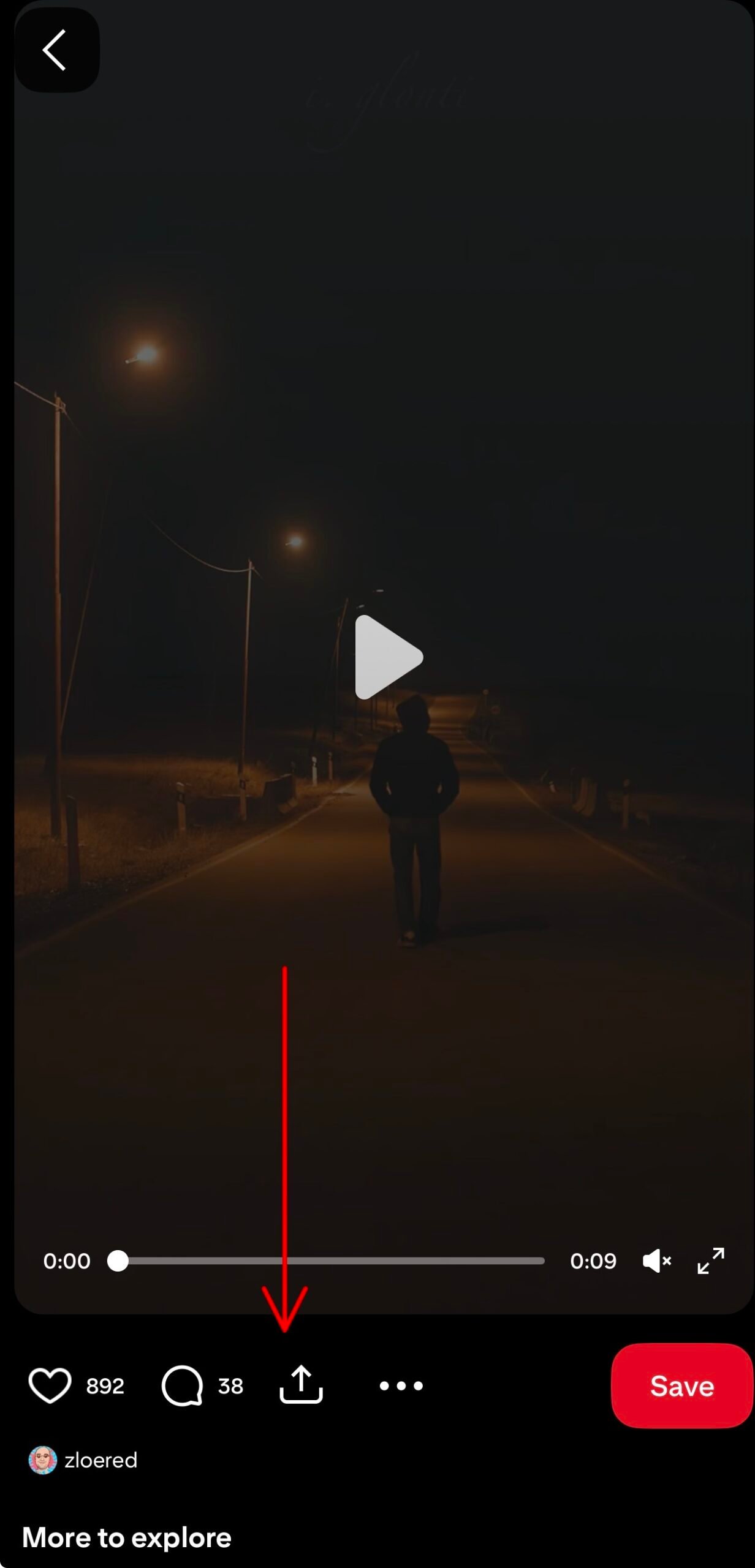
Copy the Pin's Link
Tap Send → Copy link in the mobile app, or use the share icon on desktop. Both long pinterest.com/pin/... URLs and short pin.it/... share codes work identically.
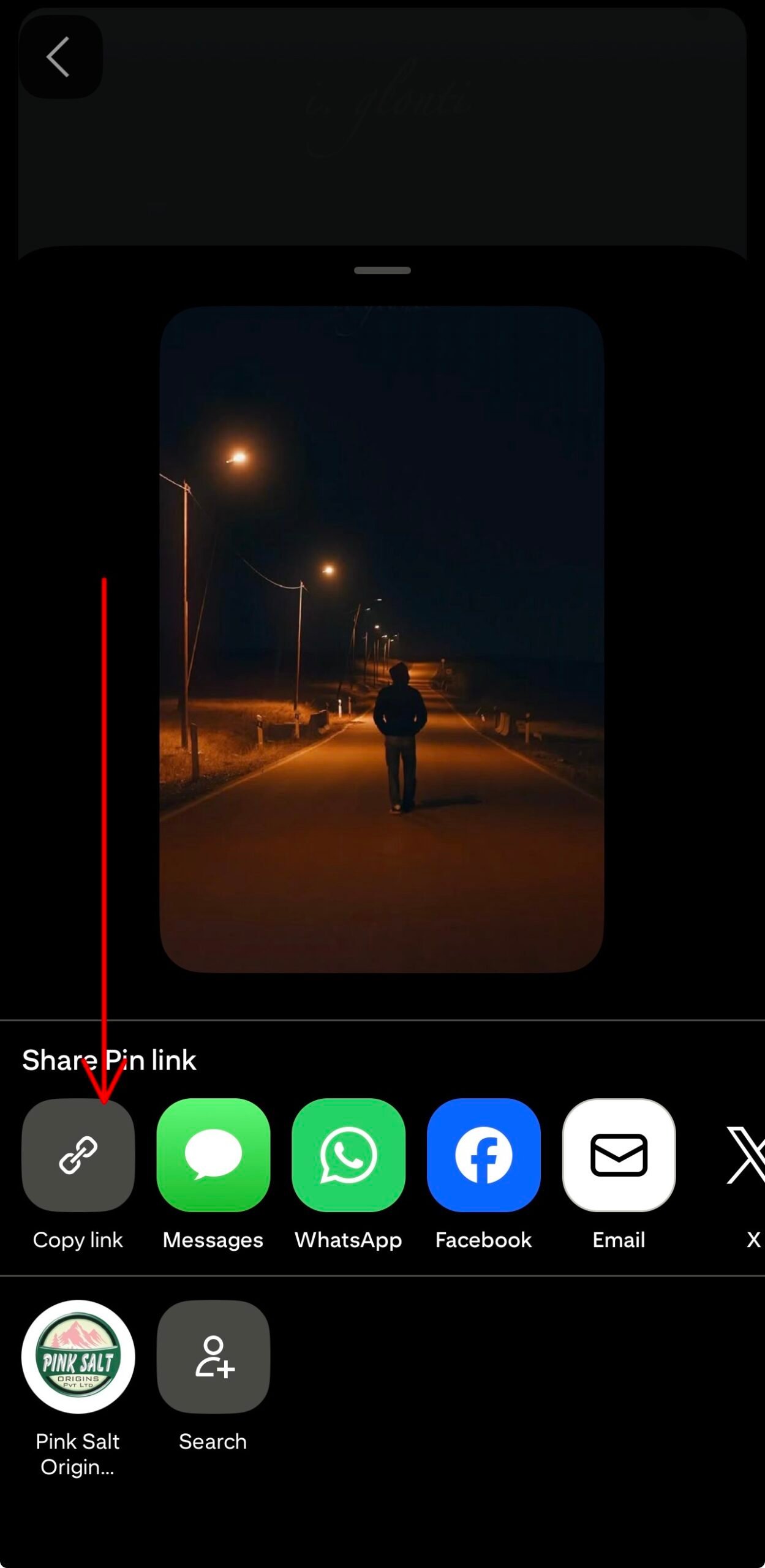
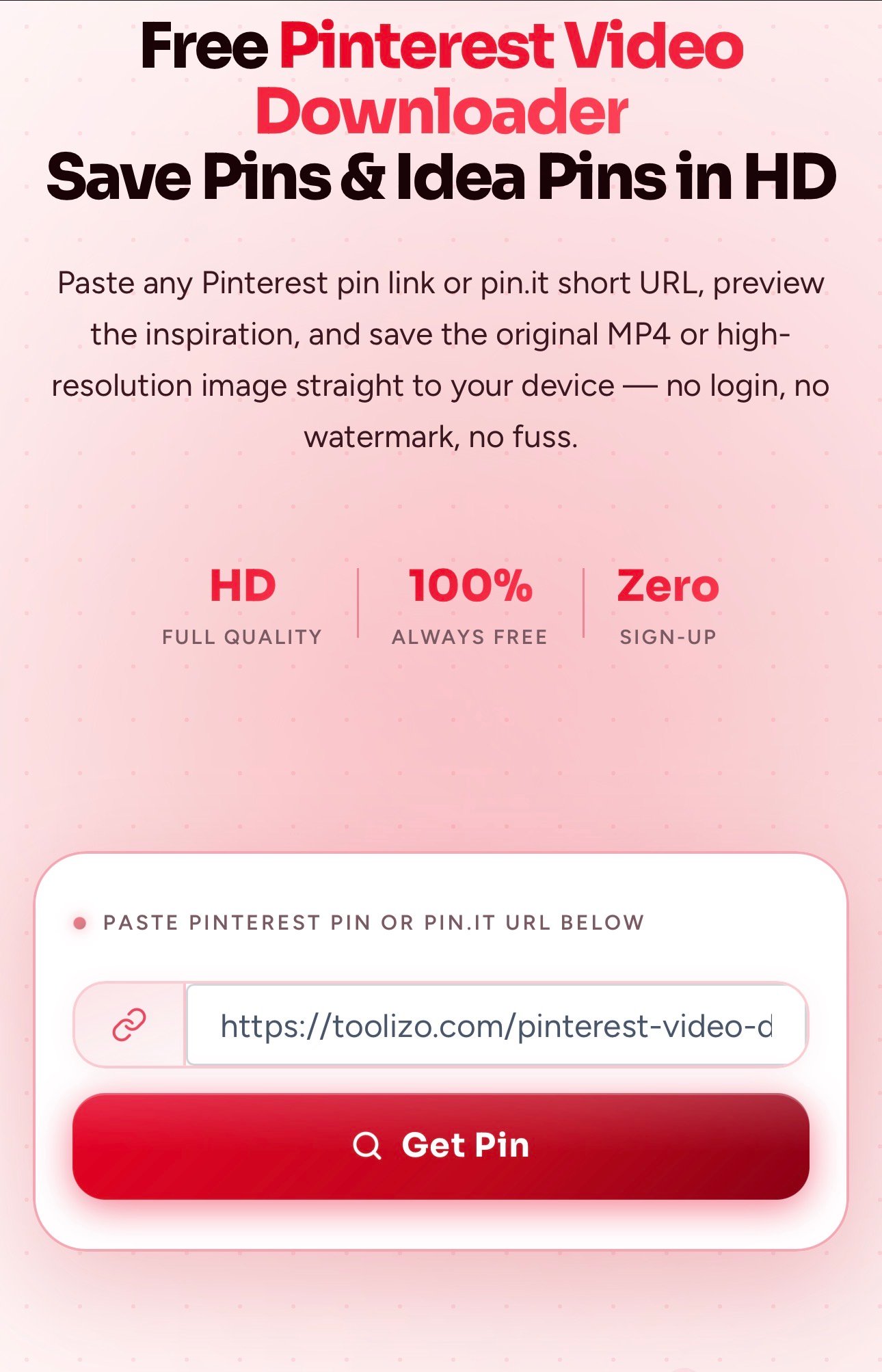
Paste the Link and Tap Get Pin
Paste the URL and hit Get Pin. A live preview appears within a few seconds; for video pins, you can scrub through the clip before deciding to download.
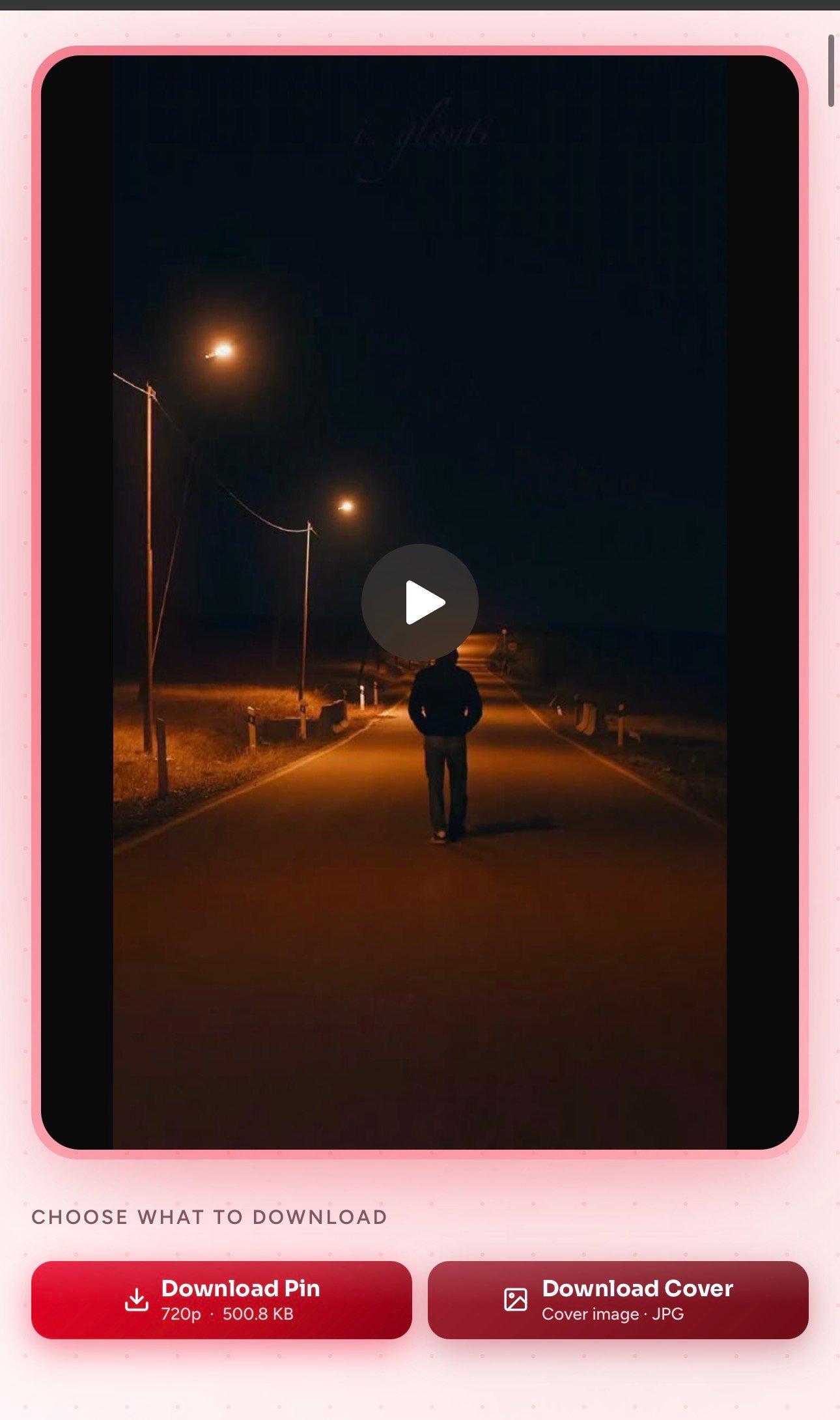
Tap Download Pin or Download Cover
Use Download Pin for the original MP4 or full-size image, or Download Cover to save just the still cover frame as a JPG. Both land directly in your downloads folder.
Advantages of Using This Pinterest Video Downloader
Genuinely Fast Fetches
Resolves Pinterest media in seconds, even on slow Wi-Fi, no queue, no captcha.
Highest Available Quality
The original encoding the pinner uploaded, typically up to 1080p video and full-resolution images.
No Login or Signup
No Pinterest account required, no email capture, no OAuth.
Privacy-Respecting
Pin URLs aren't logged, sold, or shared.
Cover Image Download Too
Save the still frame for a moodboard or blog header in one click, no screenshot trick needed.
Truly Unlimited and Free
No daily caps, no premium tier, no hidden paywall.
How Toolizo Is Different
| Feature | Toolizo | Typical alternatives |
|---|---|---|
| Direct download (file actually saves) | Yes | Often opens in new tab |
| Original quality, no re-encoding | Always | Often compressed |
| Live in-browser preview before download | Yes | Rarely included |
| Separate cover-image download | Built-in | Not offered |
| Idea Pin support (multi-frame video pins) | Yes | Often broken |
| Accepts pin.it short links | Yes | Long-URL only |
| Country domains (.co.uk, .de, .fr, .ca) | Supported | Often only .com |
| No signup, no daily limits | Truly free | Many gate features |
Use Cases (With Examples)
Cooking from a Recipe Video Offline
Example: a home cook saves a 30-second pasta-folding tutorial for next weekend. With kitchen Wi-Fi unreliable, downloading the MP4 means it plays straight from their phone, no buffering, no losing the pin if the creator deletes it.
Building an Interior-Design Moodboard
Example: someone planning a kitchen renovation collects fifteen Idea Pins of cabinet finishes and lighting setups, downloads each locally, and drops them into a moodboard, so the board still works even if a pin is later removed.
Saving DIY Craft Tutorials for Kids
Example: a parent downloads three paper-craft tutorial pins to a tablet ahead of time, so the videos play offline without ads or mid-pin recommendation rabbit-holes.
Wedding Inspiration for Vendors
Example: a bride downloads table-setting and floral pins in HD and brings them on her phone to a vendor meeting, even when the venue's signal is patchy.
Designers Grabbing Reference Frames
Example: an illustrator wants the still cover of a popular Idea Pin for colour-palette study, and uses Download Cover to fetch the full-resolution JPG instead of a low-quality screenshot.
Marketers Studying Viral Pin Formats
Example: a social media manager saves a competitor's high-performing video pin in HD to study the hook and pacing, without lossy screen-recording.
Getting More From This Tool
- Bookmark the page, or add it to your phone's home screen for one-tap access.
- Use the Pinterest app's share-sheet (share arrow → Copy link) for a clean pin.it URL ready to paste.
- Organize downloads by board, create local folders mirroring your Pinterest boards for a personal offline mirror.
- Long pinterest.com URLs with tracking parameters work fine; Toolizo strips what it doesn't need.
- Country-specific domains (pinterest.co.uk, .de, .fr, .ca, .com.au, .com.mx) are all supported.
- If a download seems stuck for more than ten seconds, refresh and retry; temporary CDN glitches are the most common cause.
Who Uses This Tool
Home Cooks & Food Bloggers
Downloading tutorial videos to follow offline in the kitchen, or archiving reference dishes while researching posts.
Interior Designers & Homeowners
Building stable moodboards of paint colours, tile patterns, and furniture that don't depend on the original pinner keeping the pin live.
Crafters & DIY Enthusiasts
Saving tutorial videos to pause, rewind, and follow along without ads or interruptions.
Brides & Event Planners
Downloading decoration and outfit pins to share directly with vendors during meetings.
Designers, Illustrators & Creators
Using full-resolution downloads as colour-palette references and layout inspiration, something a screenshot can't provide.
Marketers & Small-Business Owners
Collecting competitor pins and archiving successful Idea Pins for internal performance reviews.
Frequently Asked Questions
Yes. 100% free with no premium tier, no daily download cap, and no signup. Both long pinterest.com/pin/... URLs and pin.it/... short links are supported.
Yes, all three. Video pins return an MP4, image-only pins return the full-resolution JPG/PNG, and Idea Pins return the consolidated MP4 along with a cover image.
Yes. Toolizo accepts pin.it/abc123-style links directly; no need to expand them first.
No. Toolizo only fetches publicly visible pins. Secret boards and private profiles require login-based access no third-party tool should bypass.
The highest quality the original pinner uploaded, typically up to 1080p for video pins and Idea Pins, with no re-encoding.
No. Toolizo never burns branding into your downloaded video or image.
Yes, across Safari, Chrome, Firefox, Edge, and Brave. On iOS, the file lands in Files or your downloads folder, then can be moved to Photos with one tap.
iOS occasionally opens MP4s in Safari instead of saving them. Long-press the Download Pin button and choose Download Linked File; the file then saves into Files.
No. The URL is processed in memory and discarded immediately, with no database of past downloads.
It's intended for downloading publicly available content for personal, non-commercial use. Whether you may republish a specific pin depends on the original creator's rights and applicable copyright law.
Troubleshooting
"Invalid URL" or "Not a Pinterest Link"
Confirm the link contains /pin/ followed by a numeric pin ID, or starts with https://pin.it/. Profile pages and board pages without a specific pin won't work.
Pin Says "No Downloadable Formats"
Usually means the pin lives on a secret board, has been deleted, or links to a third-party site instead of hosting native media. Open the link in a private window; if it doesn't load there, no third-party tool can fetch it.
iPhone Opens the Pin in Safari
Long-press the Download Pin button and pick Download Linked File; the file appears in the Files app.
Download Stalls or Feels Slow
Slow networks, VPNs, and aggressive ad-blockers can interrupt the proxy stream. Toggle the VPN off or whitelist the page in your blocker, then retry.
Idea Pin Only Returns the Cover Image
Some Idea Pins are pure image carousels with no video track; the downloader correctly returns the high-resolution cover only in that case. If the pin clearly contains motion, refresh and try again; rare CDN delays can hide the video variant momentarily.
Browser Keeps Showing a Network Error
Refresh once. If it continues, try a different browser and disable extensions that interact with Pinterest; most network errors are caused by stale tokens a hard refresh resolves.
More on Toolizo
- ifunny Video Downloader — Download Memes, gifs and videos.
- YouTube Thumbnail Downloader — Download any youtube video Thumbnail in HD quality.
- Bitchute Video Downloader - Shorts Supported
- Soundcloud to Mp4 Converter
- TikTok Story Viewer - Watch TikTok Stories Anonymously
- YouTube Video Downloader — Download any youtube video, short & thumbnail in HD.
- Twitter (X) Video Downloader — Save public twitter.com and x.com videos in HD.
- Facebook Video Downloader — Save public Facebook videos and Reels in HD.
- Snapchat Video Downloader — Easily download Snapchat story & spotlight videos.
- Snapchat Story Viewer — Watch any Snapchat story anonymously.
- Instagram Video Downloader — Download any Instagram video in HD.
- Instagram Story Viewer — Watch public Instagram stories anonymously.
- Instagram Post Downloader — Download public Instagram posts & carousels.
- Instagram To Mp3 — Easily convert Instagram videos into MP3.
- Instagram PFP Download — Download Instagram profile pictures in HD.
- Profile Viewer For Instagram — Analyze any Instagram profile.
- Instagram All-in-One Downloader — Download any kind of Instagram content.
- TikTok Profile Picture Download — Download any TikTok profile picture.
- TikTok Video Downloader — Download any TikTok video in HD.
- All Toolizo Tools — Browse all free social media tools.
- Toolizo Blog — Guides, tips, and social media news.
External References
The Toolizo Pinterest video downloader is provided strictly for downloading publicly available content for personal, non-commercial use. Users are solely responsible for how downloaded pins are used afterwards.
Downloading and redistributing copyrighted videos or images without the creator's permission may violate Pinterest's Terms of Service and applicable copyright laws. Always credit the original creator and seek permission before any commercial use. Toolizo is not affiliated with, endorsed by, or connected to Pinterest, Inc. or any of its subsidiaries.
Ready to Save Your First Pinterest Pin?
Paste a Pinterest pin or pin.it link above — it takes less than ten seconds. No signup. Always free.
Start Saving — It's Free