
Downloading…
Your file is on its way — please wait a moment.
Free iFunny Video Downloader
Save iFunny Memes & Videos in HD
Paste any iFunny video, meme, or GIF link and instantly preview the clip in your browser, then save it directly to your phone or computer, no app, no signup, no watermark, completely free.
About This Tool
Toolizo's iFunny video downloader is a clean, browser-based tool that saves any publicly available iFunny video, meme, or GIF directly to your device. Skip the screen recordings, skip the sketchy "save" extensions, and skip the iFunny mobile app's download restrictions; paste the link, watch a live preview, and tap one button to grab the original MP4 file at full quality.
iFunny doesn't publish a current global user count, and older third-party estimates (around 10 million monthly users) date back to 2019 and shouldn't be presented as current. What's verifiable now: ifunny.co draws an estimated 5.59 million monthly visits in the US alone as of mid-2026, ranking it among the more heavily trafficked meme-community sites (Semrush, June 2026). The platform was built around mobile sharing, which means the website doesn't always make it easy to save content for offline viewing or repost a meme to another platform; that traffic translates directly into demand for a clean, browser-based way to get content off the app.
Toolizo resolves the actual media URL behind every iFunny post and serves it back to your browser as a real, downloadable file, not as a player you can only watch in-tab. You get two clean outputs: the original video file in the best quality the uploader published, and the cover thumbnail as a separate image.
Original Quality, No Compression
Toolizo pulls the source MP4 file at the resolution and bitrate the original uploader posted, no transcoding, no quality loss, no "lite" version.
Zero Data Retention
Every URL you submit is processed instantly and discarded. No logs of links, IP addresses, downloaded files, or browsing history.
Works on Every Device
iPhone, Android, Windows, macOS, Linux, or tablet — anything with a modern browser works without installing apps or extensions.
Clean Files, No Watermark
Your downloaded video contains exactly what was published on iFunny. Toolizo never overlays branding, logos, or promotional frames.
iFunny GIF & Meme Downloader — One Tool for Every Format
Most iFunny content sits somewhere on the spectrum between a static meme image and a full short-form video; animated GIFs, video memes with text overlays, reaction clips, and short comedic skits all share the same feed. Whatever format the post uses, Toolizo recognises it and delivers a clean download in the original file type. Video posts come down as .mp4, animated content as the source video file, and image posts include the high-resolution thumbnail.
Paste any iFunny URL, /video/, /gif/, /meme/, or /picture/, and the tool figures it out automatically.
Short Clips Download Instantly
iFunny posts are short by design; most files are under 10MB, so downloads typically finish in under a second on any decent connection.
Built for Cross-Posting
The original MP4 plays cleanly in TikTok, Instagram Reels, WhatsApp, Discord, and every other major platform, no conversion needed.
How to Download an iFunny Video
Open the iFunny Post You Want to Save
Open the iFunny app or visit ifunny.co and navigate to the content you want. Make sure the post loads publicly; content from private profiles cannot be retrieved.

Copy the Post Link
Tap the share icon on the post and choose Copy Link. iFunny links follow the format https://ifunny.co/video/POSTID, /gif/, /meme/, and /picture/ are all accepted too.
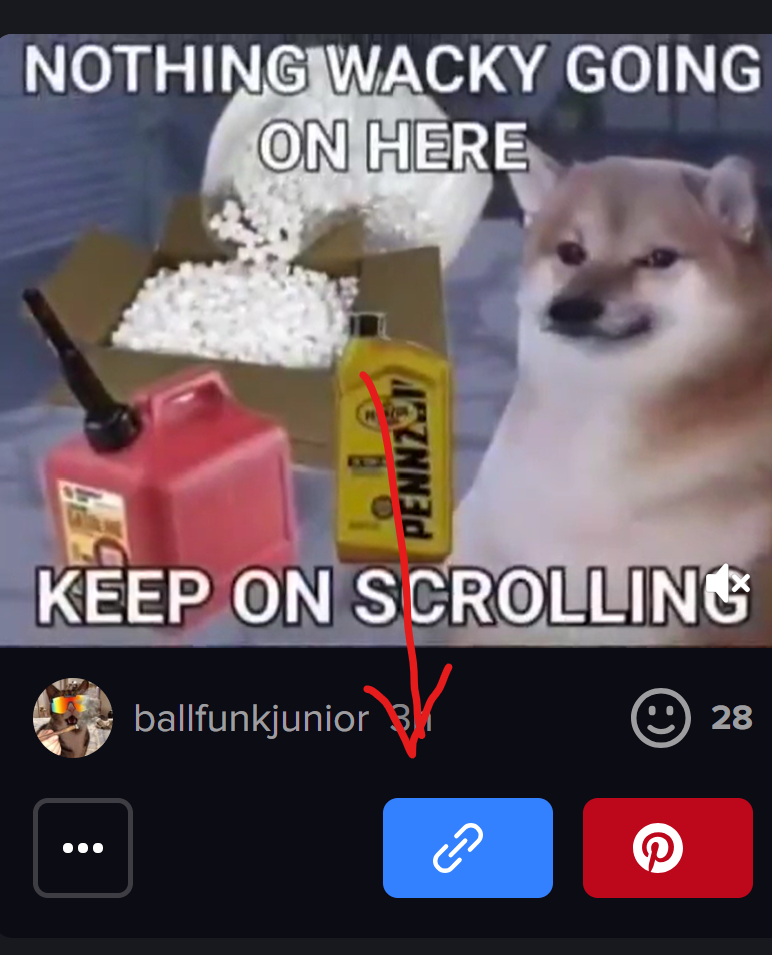
Paste the Link and Tap Get Video
Paste the URL and press Get Video. Toolizo resolves the actual media file and shows a live, scrubbable preview within a few seconds.

Save the Video or Thumbnail
Tap Download Video for the full MP4, or Download Thumbnail for just the cover image. Both land directly in your default downloads folder.

What Sets This iFunny Downloader Apart
Resolves in Seconds
No queue, no captcha, live preview within two or three seconds.
Original File Quality
The exact MP4 the uploader posted, nothing re-encoded server-side.
No Account, No Daily Cap
No signup wall, no email confirmation, no premium upgrade.
Live Preview Before Saving
Confirm it's the right post before burning data on the wrong file.
Thumbnail in One Click
Clean JPG or PNG, perfect for reaction-image collections.
Free Now and Forever
No hidden fees, no trial period, no feature gating.
Toolizo iFunny Downloader vs. Typical Online Tools
| Feature | Toolizo | Typical alternatives |
|---|---|---|
| Real browser download (not a new-tab player) | Always | Often plays in tab |
| Original quality, no re-encoding | Yes | Often downscaled |
| Live in-browser preview | Built in | Rarely available |
| Dedicated thumbnail download button | Yes | Not offered |
| Supports video, GIF, meme & picture URLs | All four | Usually video only |
| No signup or daily cap | Truly free | Often gated |
| No watermark on output | Clean file | Many add branding |
Practical Reasons People Download iFunny Videos
Cross-Posting Memes to TikTok, Reels & WhatsApp
Example: a content creator finds a clip that fits the day's TikTok trend. Instead of recording the screen and losing quality, they grab the original MP4 and upload it directly, with credit to the original creator.
Building a Personal Meme Library
Example: someone curating a reaction folder downloads clips week by week so they always have the perfect reaction video ready for WhatsApp, Discord, or iMessage.
Watching Offline During Commutes & Flights
Example: a daily commuter saves a stack of videos before heading into the subway or onto a flight, playing them offline without burning mobile data.
Creators Backing Up Their Own iFunny Uploads
Example: a meme creator wants their full back-catalogue stored locally, both as a backup and to repurpose into a YouTube Shorts compilation.
Podcasters & YouTubers Sourcing Reaction Clips
Example: a reaction-video YouTuber downloads relevant clips to drop straight into their editing timeline, with no compression artefacts from screen recording.
Designers Grabbing Thumbnail Art for Moodboards
Example: a designer downloads thumbnail art from a series of posts using the dedicated thumbnail button, at original CDN resolution rather than a downscaled phone capture.
Getting the Most Out of This Tool
- Add Toolizo to your home screen on mobile for one-tap access.
- Use the iFunny app's Share → Copy Link, not the in-app save button; the in-app save sometimes adds a watermark.
- Always preview before downloading; iFunny post IDs can look very similar.
- Save thumbnails for reaction-image collections, cleaner than screenshotting the preview.
- Both ifunny.co/video/ and www.ifunny.co/video/ work; paste whichever variant you have.
- The ?s=cl tracking parameter on shared URLs is harmless; the tool handles it correctly.
Who Uses This Tool
Social Media Managers & Community Editors
Saving trending clips to repost, with credit, on TikTok, Instagram Reels, X, and Facebook, without losing quality to screen captures.
Meme Curators & Archive Builders
Pulling clean copies of viral posts before they're buried, deleted, or removed, preserving meme history in original quality.
YouTubers & Reaction-Content Creators
Downloading clips straight into editing software, keeping pristine source quality instead of phone-screen wobble.
Daily Commuters & Offline Viewers
Pre-downloading videos for entertainment ready without burning through a mobile data plan.
iFunny Creators Backing Up Their Own Content
Keeping local backups of every upload and a personal copy ready in case anything happens to their account.
Frequently Asked Questions
Yes, 100% free, no premium tier, no daily download cap, no signup required.
ifunny.co/video/, /gif/, /meme/, and /picture/, with or without www., and tracking parameters like ?s=cl are handled automatically.
The file Toolizo retrieves is the original upload. If the creator added text or branding to the meme itself, that's part of the file, Toolizo never adds its own watermark, but can't remove one that's baked into the original. Using the public share link (rather than the app's own save button, which sometimes adds branding) avoids that entirely.
MP4 at the original resolution and bitrate the creator uploaded, typically with sound, no re-encoding, bit-for-bit identical to what plays on iFunny.
Yes. iFunny "GIFs" are technically short MP4 videos and download as such. Image memes are available via the dedicated Download Thumbnail button in JPG or PNG.
Yes, across Safari, Chrome, Firefox, Edge, Brave, and the iFunny in-app browser. On iOS, if a video opens in Safari instead of saving, long-press Download Video and tap Download Linked File.
No. Each URL is processed in memory and discarded immediately; there is no database of submitted links and no IP log tied to downloads.
Usually means the post is private, has been removed, or the URL points to a profile or feed page rather than a specific post.
Yes, a Download Thumbnail button appears after fetching, saving the cover as a full-resolution JPG or PNG from iFunny's CDN.
Intended for saving publicly available content for personal, non-commercial use. Whether you may share or republish a specific meme depends on the rights the creator has granted and copyright law in your country. Always credit the original creator when reposting.
Troubleshooting
"Invalid iFunny URL" Error
Confirm the link contains /video/, /gif/, /meme/, or /picture/ followed by the post ID. Profile pages and feed URLs don't point to a specific post.
Post Is Private or Deleted
If the URL shows an error or 404 in an incognito window, the post is private or deleted, a platform-level restriction, not a tool limitation.
File Plays Instead of Downloading
On iOS Safari, long-press Download Video and choose Download Linked File. The file saves to Files and can be moved to Photos with one tap.
Download Is Slow or Stalls
Aggressive ad-blockers, corporate VPNs, and congested Wi-Fi can interrupt media streams. Disable your VPN or whitelist the page in your blocker, then retry.
Network Error Every Time
A hard refresh clears stale cache and resolves most persistent errors. If it continues, switch browsers, some extensions intercept media requests in one without affecting another.
Preview Thumbnail Isn't Loading
Some thumbnails are served from restricted CDN paths, the video will still download successfully even if the cover preview is missing.
More Free Tools on Toolizo
- All in one instagram Download — Download post and videos.
- YouTube Thumbnail Downloader — Download any youtube video Thumbnail in HD quality.
- Bitchute Video Downloader - Shorts Supported
- Soundcloud to Mp4 Converter
- TikTok Story Viewer - Watch TikTok Stories Anonymously
- YouTube Video Downloader — Download any youtube video, short & thumbnail in HD.
- Pinterest Video Downloader — Download any pinterest video in hd.
- Twitter(X) Video Downloader — Download any twitter(x) video.
- Snapchat Video Downloader — Easily download snapchat story & spotlight videos.
- Facebook Video Downloader — Download any facebook video in HD.
- Instagram Video Downloader — Download any instagram video in HD.
- Snapchat Story Viewer — Watch public snapchat stories anonymously.
- Instagram Post Downloader — Download public instagram posts & carousel.
- Instagram To Mp3 — Easily convert instagram video into mp3.
- Instagram PFP Download — Download instagram profile picture in HD.
- Profile Viewer For Instagram — Analyze any instagram profile.
- Instagram Story Download — Download any public instagram story.
- TikTok Profile Picture Download — Download any tiktok profile picture.
- TikTok Video Downloader — Download any tiktok video in HD.
- All Toolizo Tools — Browse all free social media tools.
- Toolizo Blog — Guides, tips, and social media news.
External References
The Toolizo iFunny video downloader is provided strictly for downloading publicly available content for personal, non-commercial use. Users are solely responsible for how they use downloaded content and for ensuring their use complies with applicable copyright law and platform terms of service.
Downloading and redistributing copyrighted memes or videos without the creator's explicit permission may violate iFunny's Terms of Service and copyright laws in your jurisdiction. Always credit the original creator when reposting, and seek permission before any commercial use or large-scale redistribution. Toolizo is not affiliated with, endorsed by, or connected to iFunny, FUNCORP, or any of their related entities.
Ready to Save Your First iFunny Video?
Paste any public iFunny link above — preview, then download in under fifteen seconds. Free, always.
Start Downloading — It's Free